Borrower portal
Borrowers check their own balance, at any hour
Your customers see what they owe and what they have paid without calling the branch. Your staff spend the morning lending instead of reading balances down the phone.
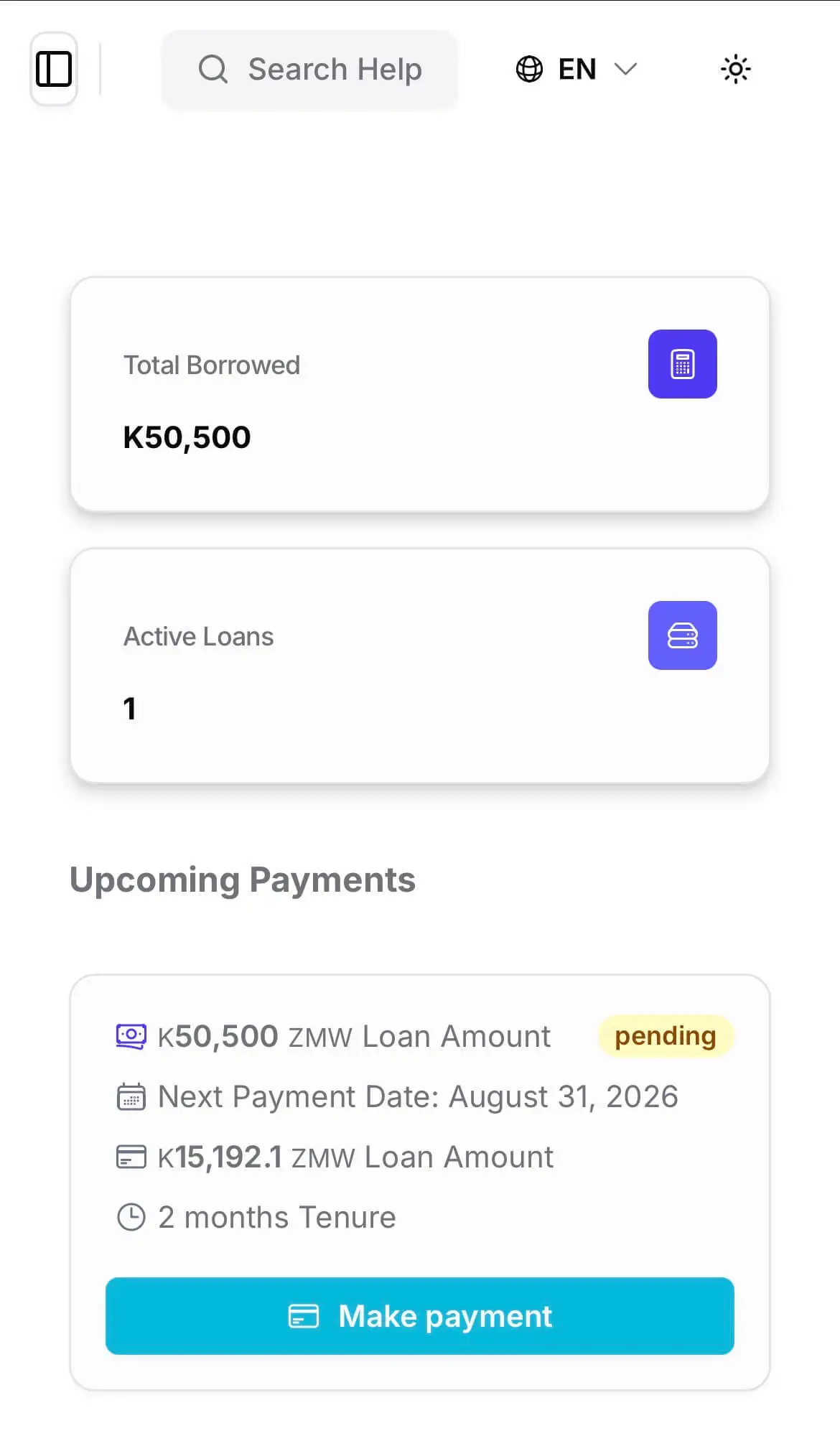
- 1Outstanding balance
- 2Next payment: date and amount
The borrower opens this in the browser on their own phone. Nothing to install, and no queue at the branch.
For the borrower
What your customer can see for themselves
Every item here is a question your branch currently answers by phone, one caller at a time.
Balance and next payment
The outstanding balance across their loans, the date the next instalment falls due and the amount of it. This is the single most common reason a borrower calls a branch, and it is answered before they pick up the phone.
The full repayment schedule
Not just the next instalment — the whole schedule, with what has been paid and what is still to come. A borrower who can see the last instalment of their loan understands where they are in it, which is the difference between a customer and a case.
Transaction history and statements
Every payment received, in order, with the date and the amount. Borrowers can take away a statement of their account and a receipt for a payment, so the record they hold and the record you hold are the same record.
Payments
Every payment shows up, whatever channel it came through
Institutions collect in different ways, and the portal does not mind which. Cash over the counter, a bank transfer, a payroll deduction, mobile money, a field officer on a collection round — whatever your staff record against the loan is what the borrower sees.
The channel is not the point. The point is that the borrower and the institution are reading the same record. A payment recorded this morning is on the borrower’s screen this morning, allocated across penalties, fees, interest and principal, with the balance and the schedule moved to match.
It also removes a whole category of phone call: the borrower who paid on Tuesday and has no way of knowing whether it landed.
- Recorded once, by whoever takes the payment
- Visible to the borrower as soon as it is recorded
- Each payment carries its own allocation
- The balance and the schedule update together
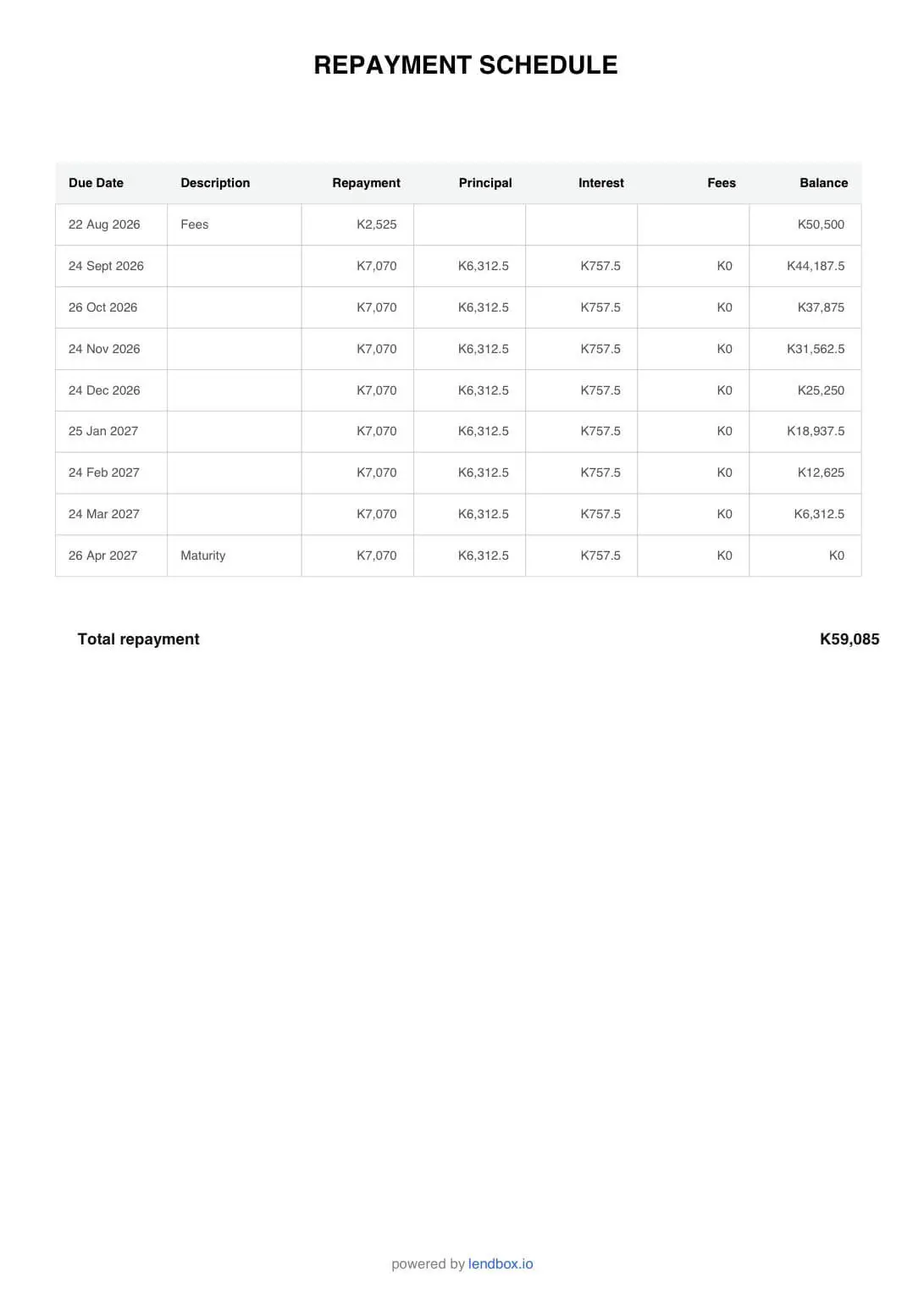
- 1Instalments already paid
- 2What is still to come, and when
The same schedule your officer is looking at, on the borrower’s own phone. Instalments already settled are not in question.
For the institution
You decide what the portal is
The portal is yours, not a Lendbox page your borrowers happen to land on. Nothing is exposed to a customer that you have not turned on.
Turn it on, per institution
The portal is enabled by the institution, not imposed on it. Lenders who are not ready to give borrowers a login simply leave it off, and nothing about the rest of the system changes.
Your branding, your domain
Your name and your logo, on your own custom domain. The borrower experiences it as your institution’s service, which matters — a trust argument only works if the borrower knows whose trust they are extending.
How borrowers get in
Borrowers reach the portal at your own address and create an account there, so a new applicant can arrive without you doing anything first. Existing borrowers can also be invited from their client record. An account is not a loan: everything a borrower requests goes through your approval workflow before any money moves.
The quiet benefit
Most balance disputes end when the borrower can see the allocation
Arguments about a loan balance are rarely about the total. They are about a payment that seemed to move the balance by less than it should have.
When the borrower can see that a payment was applied as penalty first, then fee, then interest, then principal, the conversation stops being an accusation and becomes a question about the penalty. That is a conversation your officer can actually have — and one they can have once, rather than every month.
- Every payment shows its own allocation
- The borrower’s statement and your ledger are the same data
- Fewer calls that begin “your system is wrong”
- Fewer branch visits made purely to read a number aloud
Applications
Borrowers can apply without visiting a branch
Your portal is also your application channel. A borrower opens it at your address, creates an account, and sees the loan products you actually offer — and only yours.
Before committing to anything they can see what the loan costs them: the amount they would receive, what each instalment comes to, when the first one falls due, and the full repayment schedule. An application that arrives having already seen those numbers is one your officers spend less time explaining.
The request then enters your approval workflow like any other loan. If the file is thin, ask for more information with a reason attached — the borrower updates their own profile and the application carries on from where it stopped.
- Borrowers create their own account on your portal
- They see your loan products, within the limits you set on each
- Repayment figures and the full schedule shown before they apply
- Requests enter the same approval workflow as any other loan
Before you start
- Many of our borrowers do not have smartphones.
- Then the portal is not for those borrowers, and the branch continues to serve them as it does now. It is worth turning on for the ones who do have a phone: every borrower who checks their own balance is a call your officer does not take.
- Data is expensive. Will borrowers actually use it?
- The pages are small and load on a slow connection. A borrower checking a balance is moving a few kilobytes, which is cheaper for them than travelling to a branch to be told the same number.
- What can a borrower change?
- Nothing that affects their loan. They can see balances, schedules, history and documents, and request a loan. They cannot alter a balance, a schedule, a repayment or anything else on the loan record.
Questions people ask
- It is a page your borrowers log into to see their own loan: the outstanding balance, the next payment due, the full repayment schedule, their transaction history and their loan documents — without contacting the branch.
- Yes. A payment appears on the borrower’s screen as soon as it is recorded against the loan, whatever channel it arrived through, with its allocation across penalties, fees, interest and principal and the balance updated to match.
- Online repayment is available in some markets. Where it is not, the portal is used for balances, schedules, statements, history and documents, and repayments continue to arrive through the channels you already use.
- Yes. The portal carries your name and logo and can run on your own custom domain, so borrowers see it as your service.
- No. The portal is read-only against the loan record. Borrowers can view, download, request a new loan and pay — they cannot edit balances, schedules or repayments.
- No. The portal runs in a phone or desktop browser, so borrowers have nothing to download and nothing to update — and a borrower on a low-end phone is not shut out by an app they cannot install.
- They can create an account on your portal themselves, and existing borrowers can also be invited from their client record. Either way they see only their own loans, and anything they request goes through your approval workflow.
- Yes. They see the products you offer, choose an amount and a term within the limits set on each product, and see what they would receive and repay — including the full schedule — before submitting. The request then enters your approval workflow.
What is a borrower self-service portal?
Can borrowers see whether a payment has been received?
Can borrowers repay through the portal itself?
Can we brand the portal as our own institution?
Can a borrower change anything about their loan?
Is there a borrower app to install?
How does a borrower get access?
Can borrowers apply for a loan through the portal?
Whichever part brought you here, this comes with it
- Unlimited borrowers, loans and files
- No charge per record. Your bill does not grow because your book did.
- Your staff on web, Android and iOS
- The same data on a laptop at the branch and on a phone in the field.
- A complete audit trail
- Every action carries the name of the person who took it and the time they took it.
Put this on your own loan book
Create an account, set up one loan product, and run a real loan through it end to end. Nothing to install.
30-day free trial. No card required.