Reports and insights
The numbers are ready before anyone asks for them
Your board, your regulator, your auditor and your Monday morning all want different figures. Each of them has a report that answers it, built from the same ledger.
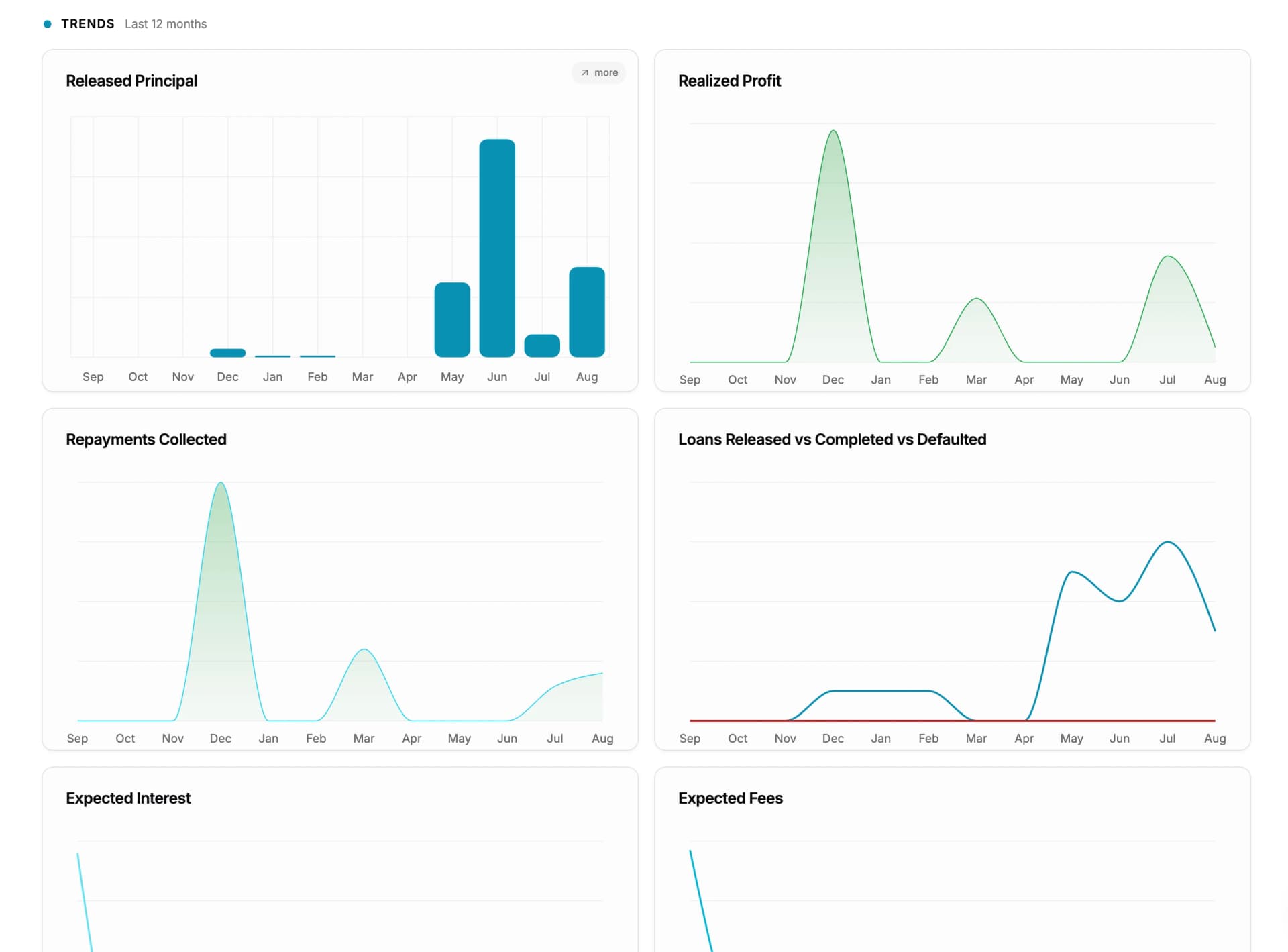
- 1Portfolio position, live
- 2Risk cards, surfaced before you go looking
The dashboard is not a summary someone prepared. It reads the same records the loan officers are working in.
By who is asking
Four audiences, four sets of numbers
Reporting fails when it produces one dashboard for everyone. These are organised by the person standing in front of you.
For the board
Is the book growing, is it collecting, and is it making money? Quarterly, and in a form that can go into the pack without being retyped.
- Overview dashboard — portfolio position and growth
- Trends — disbursements and collections over time
- Loan product metrics — which products earn and which do not
- Principal analysis — where the book is concentrated
- Profit and loss — interest, fee and penalty income, separately
For the regulator and the auditor
Who decided what, when, and on whose authority? This is the set that decides whether an inspection is a morning or a fortnight.
- Decisions report — every approval and rejection in a period
- General ledger — the full posted ledger for any period
- Trial balance — with the debit and credit totals at the foot
- Audit trail — the action-level record behind all of it
For credit policy
Where is the risk building, and who is carrying it? The questions you ask before you change a product or move a portfolio.
- Portfolio at Risk (PAR) — with the outstanding it applies to
- Arrears report — by bucket, by branch and by officer
- Staff performance — arrears and collections by loan officer
- Rejection patterns — from the Decisions report
For Monday morning
What is due today, what came in yesterday, and what is waiting on a decision? The three things operations needs before the branch opens.
- Repayments report — table view or calendar view
- Arrears report — filtered to what just fell overdue
- Approval Center — everything waiting on a signature
Portfolio at risk
PAR, and the buckets underneath it
Portfolio at Risk is shown against the outstanding balance it applies to, so the ratio and the amount are read together. A PAR that moved because the denominator shrank is a different story from one that moved because loans went bad, and you can see which happened.
Underneath it, arrears are broken into buckets — 1–30 days, 31–60, 61–90 and 90 or more — and graded Early stage, Monitor, At risk and Critical.
Arrears are also split by whether the loan is still within its term or has passed its maturity date. A loan that has missed a payment with six months left to run is a collections problem. A loan that has missed payments and is already past maturity is a different problem, and averaging the two hides both.
- Buckets: 1–30, 31–60, 61–90 and 90+ days
- Grades: Early stage, Monitor, At risk, Critical
- Split by within term and past maturity, or combined
- Broken down by branch and by loan officer
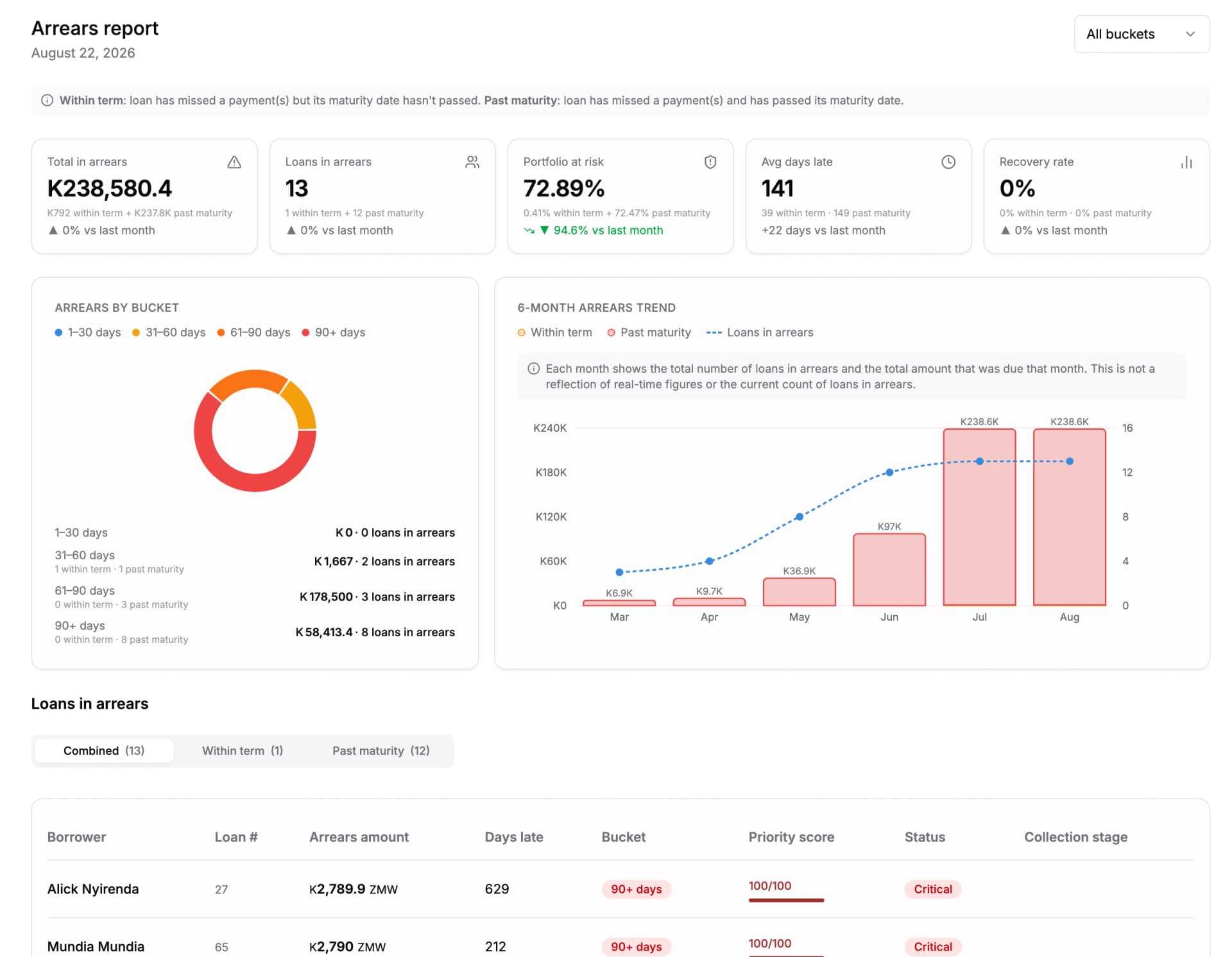
- 1Aging buckets, with the amount in each
- 2Within term against past maturity
The buckets are the report. The single PAR number is the headline on top of them.
What it does
How the reports are used
The difference between a report and a reporting module is whether the answer arrives in the shape the question was asked in.
The decisions report, built from the audit trail
Every approval and rejection in a period, with the borrower, the amount, the decision, the decision date and the user who made it. Items are filed by the date the final action was recorded, not the date they were submitted — which is the version a regulator is asking for. It covers loans, repayments, transactions and loan changes together.
Filters, saved views and export
Filter by date range, branch, officer, loan product, amount band and status. Save a set of filters as a named view and return to it next month — the view keeps the filters, not a frozen copy of the data. Export to Excel or PDF; larger reports are emailed when they are ready.
A print layout that stands on its own
The print view carries the filters that were applied, the user who generated it and the timestamp, in its header. A printed report that does not say what it was filtered to is not evidence, and an auditor will treat it accordingly.
Collections, day by day
The repayments report shows what is due and what arrived, as a table or as a calendar. Statuses separate Paid, Partial, Pending, Missed Payment and Past Maturity, so a partially paid instalment is not counted as either a success or a failure.
Branch against branch
Every report takes a branch, and the dashboard tells you plainly when you are looking at all branches combined. Compare branches on the same metrics and the same period, from the same underlying records — no branch is reporting on itself.
Business intelligence
The insight finds you, on the page you are already on
Most reporting assumes you already suspect something. You go to the reports section, choose a report, set a date range and find out whether you were right.
Lendbox also puts contextual cards inline, between the page header and the page itself. Two or three insights relevant to what you are currently looking at, graded from information through to alert, with a link that either takes you to the detail or expands it where you are. You can collapse the strip, and it stays collapsed for you.
- Two or three insights, on the page you are already working in
- Graded: success, information, warning, alert
- Expand the detail inline, or follow it through to the report
- Collapsible, and it remembers
Before you start
- Can we build a report we need that is not on this list?
- Start with the filters — most requests turn out to be an existing report with a different date range, branch or product, which you can save as a named view. Where that is genuinely not enough, export to Excel and build on top of the same figures.
- Can reports be scheduled or emailed?
- Larger exports are generated in the background and emailed to you when they are ready, so a big report does not tie up your screen. Saved views mean the monthly report is two clicks rather than a rebuild.
- Do the reports agree with the accounts?
- Yes, because they are not separate systems. The portfolio reports and the financial statements are produced from the same posted records, so a figure on a report and the same figure on the trial balance came from the same place.
Questions people ask
- PAR is shown against the outstanding balance it applies to, with arrears broken into 1–30, 31–60, 61–90 and 90+ day buckets and graded from Early stage to Critical. Arrears are also separated into loans still within their term and loans past their maturity date.
- Yes — the decisions report. It lists each item with the borrower, the amount, the decision, the decision date and the user who made it, filed by the date the final action was recorded, and it is built from the audit trail.
- Yes. Reports filter by date range, branch, officer, loan product, amount band and status, and a set of filters can be saved as a named view to return to.
- Excel and PDF. Larger reports are generated in the background and emailed when ready. The print layout carries the applied filters, the generating user and the timestamp in its header.
- They are contextual insight cards shown between the page header and the page content, carrying two or three insights relevant to what you are looking at, graded by severity, with detail that expands inline or links through to the full report.
- Yes. Both are produced from the same posted records, so the loan book and the accounts do not have to be reconciled against each other.
How does Lendbox calculate portfolio at risk?
Is there a report showing loan approvals and rejections for a period?
Can reports be filtered by branch and loan officer?
What formats can reports be exported to?
What are the inline business intelligence cards?
Do the portfolio reports match the financial statements?
Whichever part brought you here, this comes with it
- Unlimited borrowers, loans and files
- No charge per record. Your bill does not grow because your book did.
- Your staff on web, Android and iOS
- The same data on a laptop at the branch and on a phone in the field.
- A complete audit trail
- Every action carries the name of the person who took it and the time they took it.
Put this on your own loan book
Create an account, set up one loan product, and run a real loan through it end to end. Nothing to install.
30-day free trial. No card required.