Security and controls
Catch it before disbursement. Know who did it afterwards.
Two different problems live under one heading. Fraud that arrives with the application, and fraud that happens inside your own institution. Lendbox treats them separately, because they are stopped by different things.
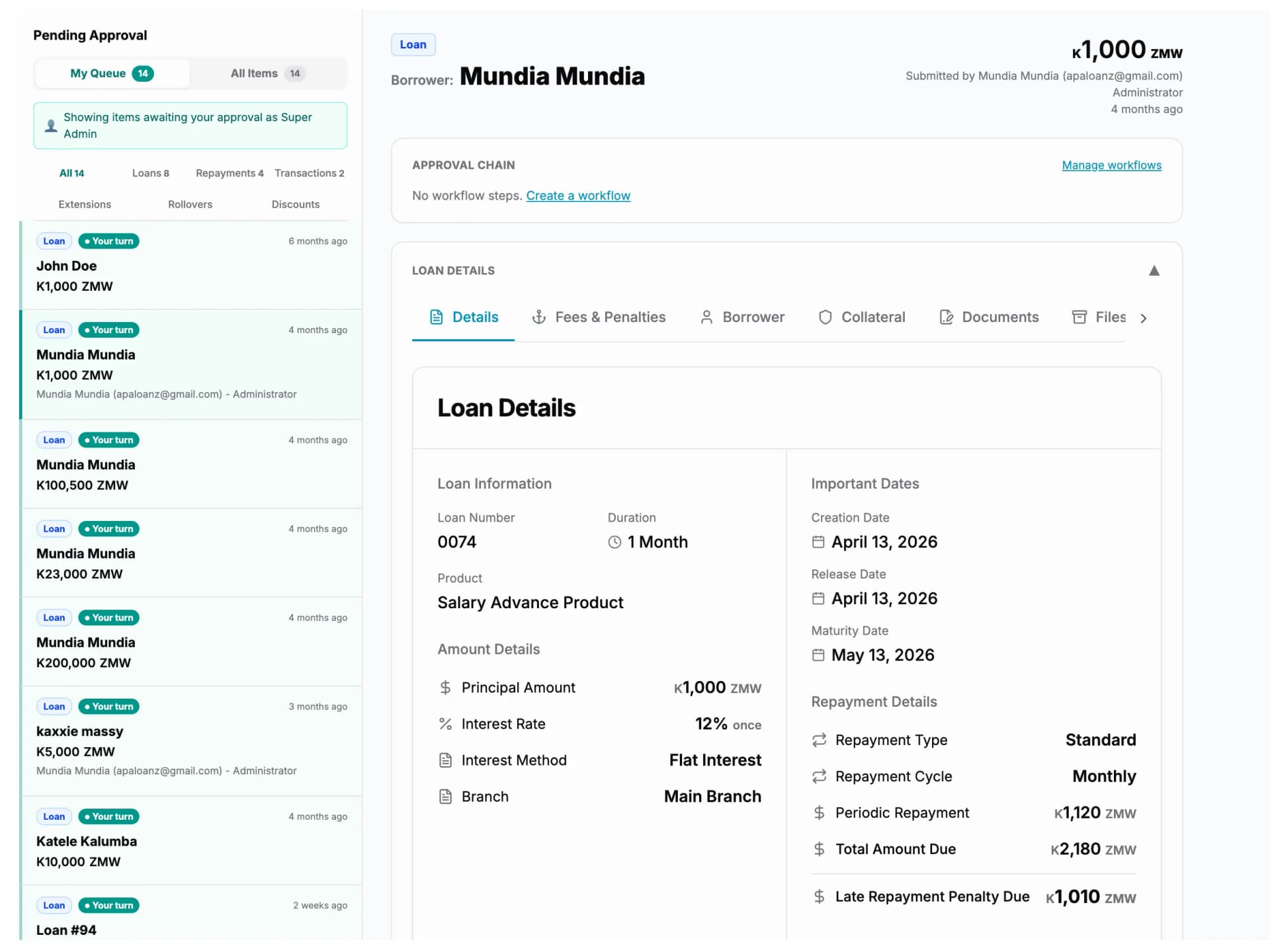
- 1Every item waiting on a decision, in one queue
- 2Who raised it, and which stage it is waiting on
Nothing is approved in a chat thread or over the phone. Everything waiting on a decision sits in one queue, carrying the name of whoever raised it.
Two problems, not one
Most losses are not clever. They are internal.
External fraud gets the attention: the forged payslip, the borrowed identity document, the same person applying twice under two spellings of their name.
Internal fraud is quieter and usually larger. A loan approved by the person who raised it. A repayment recorded but never banked. A record deleted after the fact. These are not caught by a smarter check at the door — they are prevented by controls, and they are proved by an audit trail.
- At the door: document fraud detection and risk scoring
- Inside the institution: maker-checker, permissions, branch scoping
- After the fact: attribution on every action, and recoverable deletions
At application
Fraud checks on what the borrower gives you
Documents uploaded to Lendbox are checked as they arrive — the ID photograph, the payslip, the business record, the borrower’s own picture.
Document fraud detection
Each uploaded file is assessed and carries a risk level: low, moderate, high or critical. A file the system considers high risk is marked “High Risk of Fraud”; one it considers manufactured is marked “Fraudulent”. The mark sits on the document itself, with a description of what was found, so the officer sees it while appraising rather than in a report afterwards.
It flags. It does not decide.
A flag is information given to a person, not a rejection issued by a machine. The officer still appraises the loan, and a flagged application can go forward if there is a good reason — which is then part of the record, because the decision carries the name of whoever made it.
At appraisal
A risk score the officer can argue with
Requested on an application, from what the institution actually knows about the loan being asked for.
The score is computed from the terms of the loan itself — amount, duration, interest method, repayment cycle, fees and penalty configuration — together with the borrower’s profile and the collateral attached to the application.
It comes back as a number with a written explanation of how it was reached. Where the borrower’s profile is too thin to score properly, it names the fields that are missing instead of scoring around them, so the officer knows the difference between a risky borrower and an incomplete file.
It is decision support. It does not approve loans, it does not reject loans, and it does not replace your credit policy — the workflow you drew still decides who signs.
- A score, with a written summary of what drove it
- Computed from the loan terms, the borrower profile and the collateral
- Names the missing profile fields rather than scoring around them
- Requested by the officer, on the application in front of them
Two problems, not one
The controls that stop internal fraud
This is the half of the page that most matters to an MFI, because this is the half that addresses where the money actually goes.
Maker-checker
The person who raises something is not the person who approves it. It applies to loan approvals, to repayments, to journal entries, and to changes made to a loan after it is running. An entry raised by one user sits as pending until a second user with the right permission accepts it — which is a control your auditor will ask about by name.
Permissions, module by module
Access is not a single switch. Each module is set to a level for each role — None, View Only, Can Request, Can Approve, Can Edit or Has Access — so a collections clerk can record a payment without being able to approve one, and a branch manager can approve without being able to rewrite a loan product.
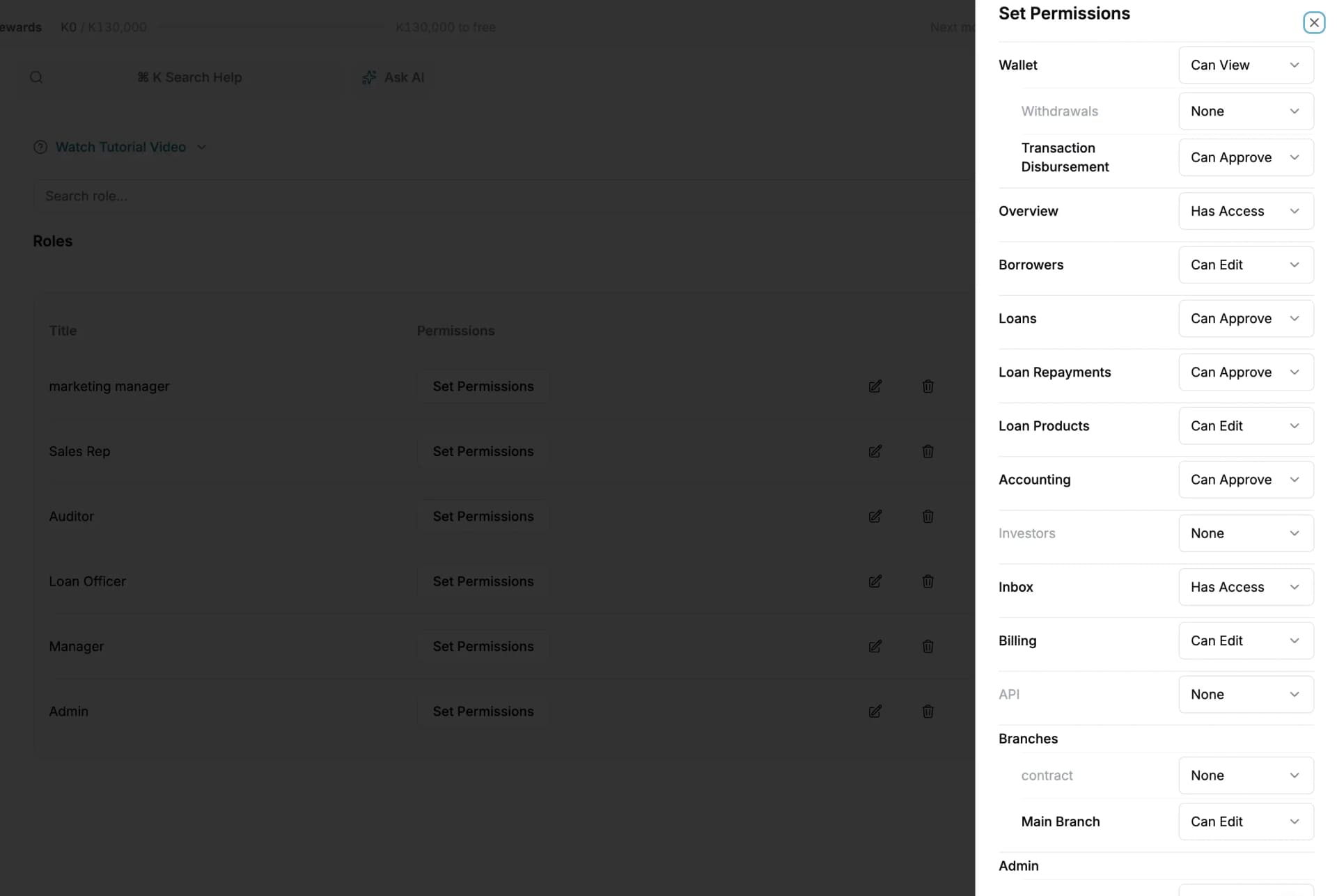
- 1One module, one level, per role
- 2Sub-permissions nested under a module
Six levels, set per module. “Can Request” and “Can Approve” are deliberately different things.
A role per branch, not per person
Staff hold a role in each branch they work in, and the roles can differ. The same person can be a loan officer in one branch and a manager in another, with exactly the rights each branch intends. Nobody is given institution-wide authority because it was easier to configure.
Concessions are approvals, not favours
Extending a loan, rolling it over, or discounting what is owed are the quiet ways money leaves a lender. In Lendbox each one is a request rather than an edit: raised by one user, approved by another, and not in effect until it is. Until then the loan still shows what it actually owes, and the concession appears on the decisions report with both names against it.
After the fact
The record of who did what
Every action is attributed to a user and stamped with a time, against the record it happened to. Created, edited, approved, deleted — all of it.
Deletion does not erase the trail. Deleted records move to the recycle bin and can be restored, and the restore is itself an attributed action. An audit trail that a user can quietly remove entries from is not an audit trail.
- The user and the timestamp on every action
- The approver at each stage of every workflow
- Deletions recoverable from the recycle bin
- Restores attributed like any other action
Data protection
Where your data sits, and who can reach it
Data is encrypted in transit and at rest. Access follows the permission and branch rules you set — there is no view that quietly ignores them, and administrator access is itself a permission held by named people.
Backups are taken and retained. Your records stay exportable for as long as you hold an account — clients, loans, transactions and the full ledger — so the data you put in is data you can take out.
- Encrypted in transit and at rest
- Access governed by role and branch, with no bypass
- Administrator access is a named permission, not a shared login
- Your data is exportable, including on the way out
Before you start
- Can an officer override a flag?
- Yes, and that is deliberate — a flag is information, not a verdict. What cannot be overridden is the record: the application still shows that it was flagged, and the approval still carries the name of the person who went ahead.
- Who can see the audit trail?
- It follows your permissions like everything else, so you decide which roles can read it. What no role can do is edit or remove entries from it.
- What happens to our data if we leave?
- You export it — clients, loans, transactions and the full ledger. Your records are not held back to keep you subscribed.
Questions people ask
- Documents uploaded against a borrower or a loan — identification, payslips, business records, borrower photographs — are assessed and carry a risk level of low, moderate, high or critical, together with a description of what was found. The flag is shown to the officer during appraisal.
- No. It returns a number and a written explanation as decision support for the officer. Approval is decided by the workflow you configured, by named people who sign for their own decisions.
- Maker-checker means the person who raises an action cannot be the person who approves it. In Lendbox it applies to loan approvals, repayments, journal entries, and changes to a running loan such as extensions, rollovers and discounts.
- Permissions are set per module and per role, across a scale of None, View Only, Can Request, Can Approve, Can Edit and Has Access. Modules carry their own sub-permissions, and staff hold a role per branch rather than one role across the institution.
- Deletions move records to the recycle bin, where they can be restored, and both the deletion and the restore are attributed to the user who performed them. The audit trail itself cannot be edited.
- No, and any lending system that says otherwise should be treated carefully. What Lendbox does is flag risky documents before disbursement, make internal fraud require two people instead of one, and make every action attributable afterwards.
What fraud checks does Lendbox run?
Does the risk score approve or reject loans?
What is maker-checker, and where does Lendbox apply it?
How granular are staff permissions?
Can a user delete something to cover their tracks?
Does Lendbox guarantee that fraud will not happen?
Whichever part brought you here, this comes with it
- Unlimited borrowers, loans and files
- No charge per record. Your bill does not grow because your book did.
- Your staff on web, Android and iOS
- The same data on a laptop at the branch and on a phone in the field.
- A complete audit trail
- Every action carries the name of the person who took it and the time they took it.
Put this on your own loan book
Create an account, set up one loan product, and run a real loan through it end to end. Nothing to install.
30-day free trial. No card required.