
Lendbox Features

Everything running a loan book asks of you, in one system — the lending, the borrowers, the ledger, the controls, the reporting, and the work that sits between them. Open whichever part matches the problem you came with.

How it works

What does Lendbox do?

Lendbox is loan management software for lenders, microfinance institutions and SACCOs. It holds the loan book, the borrower records, the general ledger and the reports in one system. A loan is written against a product, and the product sets the interest, the fees and the penalty rules. The schedule is generated at disbursement and stored on the loan. Each repayment is split by a fixed waterfall. Each loan event posts to the ledger by double entry. Every action carries the name of the person who took it and the time they took it. Staff use it on the web, on Android and on iOS. Borrowers use their own portal.
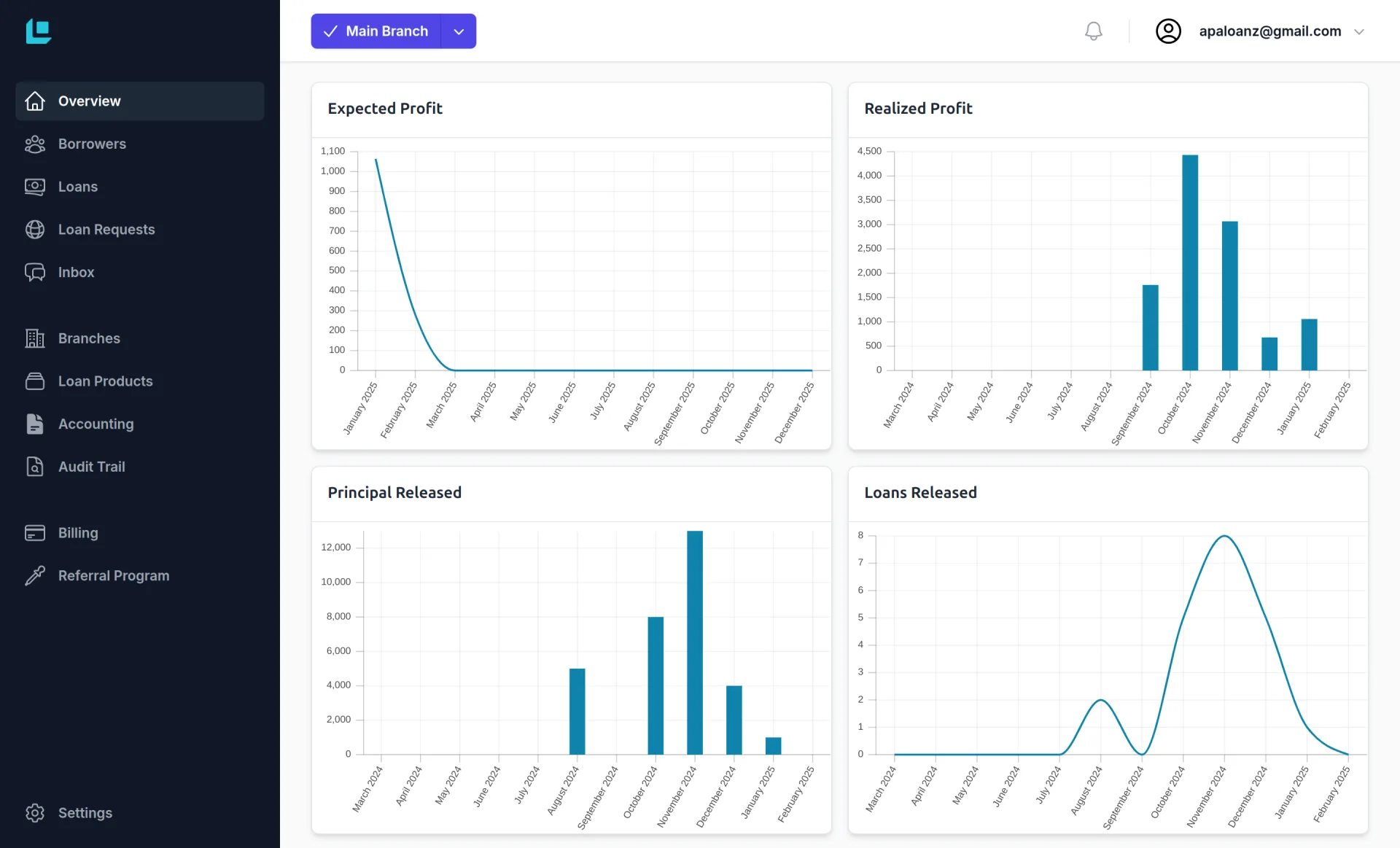
The Lendbox dashboard, showing portfolio charts, portfolio at risk and repayments collected

How does Lendbox work out interest, fees and penalties?

Through loan products. You set the terms once, and every loan written on that product follows them. Interest is flat or reducing balance. The day count is Actual/365 or 30/360. An arrangement fee is a percentage or a fixed amount, charged upfront or spread over the term. A penalty rule fires when an instalment is missed. A grace period can cover principal, interest, or both.

The repayment schedule is generated at disbursement and stored on the loan. It is not recalculated each time the page opens. The instalment you quoted a borrower in March is the one the system still shows in November. Changing a product cannot rewrite a loan that is already running.

More on Loan Management

How is a repayment split between penalties, fees, interest and principal?

By a waterfall. A waterfall is the rule that decides which part of a debt a payment settles first. The money fills each category in turn and stops when it runs out: penalties first, then fees, then interest, then principal. The order is fixed and the same on every loan, so two officers cannot apply the same payment two different ways. The split is recorded on the repayment itself. The answer to “where did my money go” sits on the payment.

More on Loan Management

Who approves a loan, and how is that recorded?

Whoever your credit policy names, in the order it names them. You draw the approval chain on a canvas: loan officer, branch manager, credit committee, or any chain you run. Maker-checker means the person who raises a loan is not the person who approves it. Everything waiting on a decision sits in one queue, the Approval Center. Each decision carries the user, the date and the time. The decisions report lists every approval and rejection in a period, filed by the date the final action was recorded. That is the version a regulator asks for. Roles set which modules a staff member can use, and branch scoping sets which clients and loans they can see.

More on AI Security

Does Lendbox include accounting?

Yes. A double-entry general ledger is built in, and the loan book posts to it. A disbursement, an accrual, a repayment, a fee, a penalty or a write-off becomes a journal entry as it happens. Nobody re-keys it, and each entry keeps a link to the loan that caused it.

You keep your own chart of accounts, with opening balances and the date they apply from. The trial balance, profit and loss, balance sheet and cashflow come from the posted ledger for any period. Interest income, fee income and penalty income are separate lines. Every entry carries its branch, so one branch or the whole institution reports from the same data. A posted entry is not quietly editable: a change is raised for approval and a second user has to accept it.

More on Integrated Accounting

What does the borrower see?

Their balance, their next payment, their full schedule and their payment history. The borrower portal opens in the browser on the borrower’s own phone, with nothing to install. It carries your branding and your domain, and statements and receipts can be downloaded. Nothing is visible that you have not turned on. Reminders go out by SMS, email or WhatsApp when a loan is created, before a due date and when a payment is received. The branch answers fewer balance calls and settles fewer disputes.

More on Borrower Portal

What does Lendbox check before you disburse?

Four things. Uploaded IDs and documents are checked for signs of tampering and flagged for review. A risk score is generated for the borrower from their credit history. An identification number that already exists on the system raises a duplicate warning, so a repeat borrower is matched to the file you already hold. Guarantor exposure is shown across your whole book, so you can see the four loans a trader already stands behind before you accept the fifth.

More on AI Security

Which reports come out of the box?

Portfolio at risk, arrears, repayments, decisions and branch comparison. Portfolio at risk is shown with aging buckets. The arrears report lists who is late, by how much and for how long. The repayments report shows what was due and what arrived, as a table or a calendar, and keeps Paid, Partial, Pending, Missed Payment and Past Maturity apart.

Every report takes a date range, a branch, an officer, a loan product, an amount band and a status. Save a set of filters as a named view and come back to it next month. Export to Excel or PDF. The print view carries the filters, the user and the timestamp in its header. The dashboard reads the same records the loan officers work in.

More on Reports & Insights

Can we move an existing loan book onto Lendbox?

Yes, without closing the current book. Import clients and loans from Excel templates, each loan at its original terms and release date. Then upload its past repayments with the dates they were collected, so its balance and schedule continue from where they are today. Duplicate identification numbers are caught on the way in. Each ledger account takes an opening balance and the date it applies from. Your data stays exportable for as long as you hold an account, with no request to us.

More on Client Management

Ready to start managing loans?
Start your free trial today.