Loan management
Every loan traceable from application to closure
One system of record for the whole loan lifecycle. Every decision, payment and document sits on the loan, next to the name of the person who put it there.
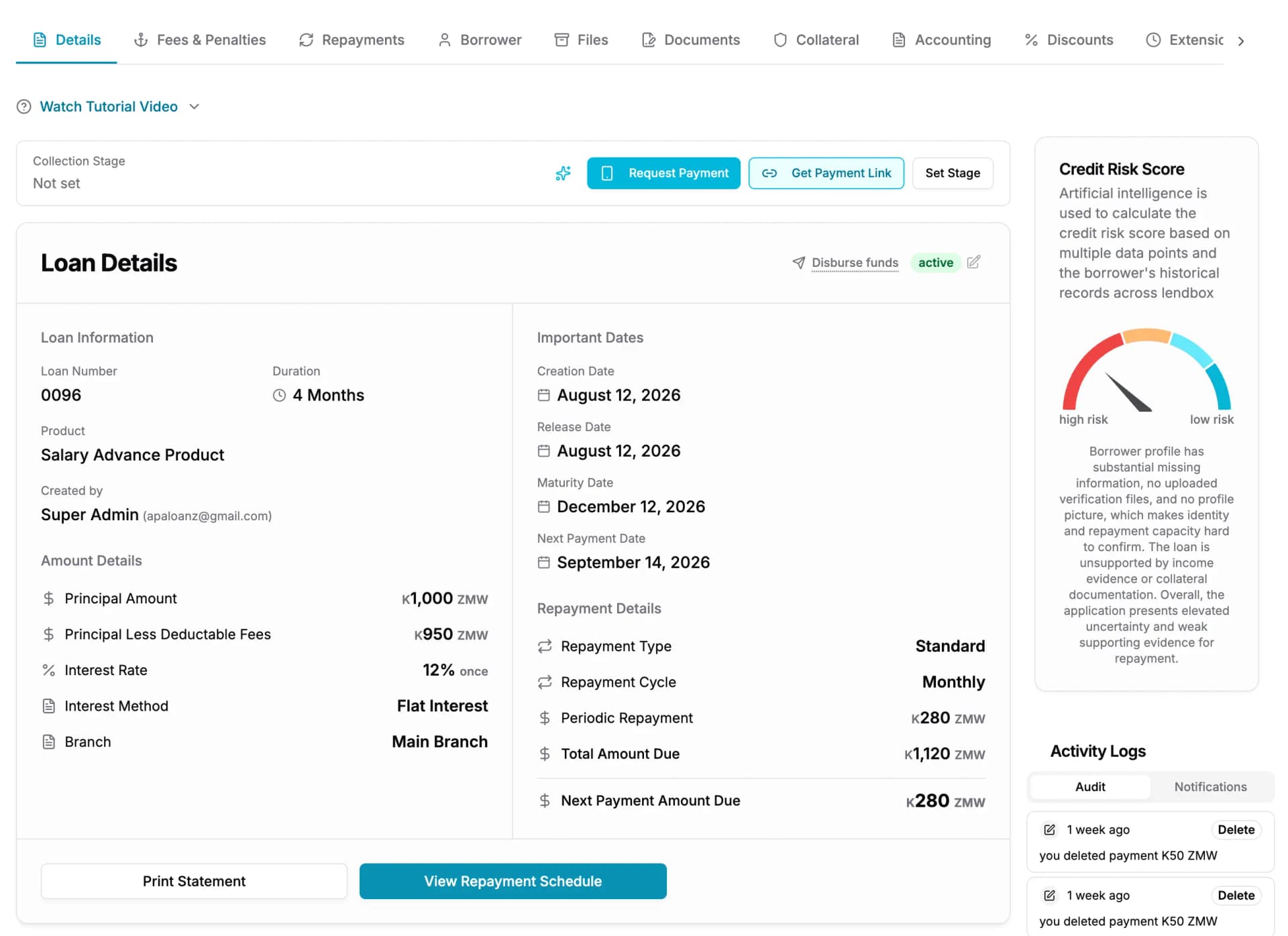
- 1The repayment schedule, generated at disbursement and stored
- 2Running balances for principal, interest, fees and penalties
One loan, one page. The schedule, the balances, the documents and the history of who did what are all on the same record.
The lifecycle
Seven stages, one record
A loan does not move between systems as it ages. It moves between stages, and everything it collected on the way stays attached to it. It is the first thing to check when comparing web-based loan management platforms.
- 1
Application
The borrower, the amount and the purpose are captured once and stay on the loan.
- 2
Appraisal
The officer sees the borrower’s full credit history and any flags before recommending a decision.
- 3
Approval
The loan moves through the stages you drew. Each approver signs for their own decision.
- 4
Disbursement
Release the funds and the loan opens. The schedule is generated and stored the same moment.
- 5
Repayment
Payments post against the schedule and allocate down the waterfall: penalties, fees, interest, principal.
- 6
Arrears
A missed instalment ages the loan into a bucket and appears on the arrears report.
- 7
Closure
The loan closes when the balance clears. The whole record stays exactly where it is.
What it does
What the system of record actually holds
Each of these is a place a spreadsheet leaks. A number that can be typed over, a decision that lives in a chat, a schedule that changes when someone edits a formula. Judge micro loan management software on these before anything else.
Loan products
Set the terms once and every loan written on that product follows them. Flat or reducing balance interest. Day count on Actual/365 or 30/360. Arrangement fees as a percentage or a fixed amount. Penalty rules that fire on a missed instalment. Grace periods on principal, interest, or both.
Approval workflows
Draw your approval chain on a canvas — loan officer, branch manager, credit committee, or whatever your credit policy actually says. Maker-checker means the person who raises a loan is not the person who approves it. Everything waiting sits in one queue, so approvals stop happening over WhatsApp.
Repayment schedules
The schedule is generated at disbursement and stored on the loan. It is not recalculated each time the page opens. The instalment you quoted a borrower in March is the instalment the system still shows in November, and changing a product cannot silently rewrite a loan that is already running.
Waterfall allocation
A waterfall is the rule that decides which part of a debt a payment settles first. The money fills each category in turn and stops when it runs out: penalties, then fees, then interest, then whatever is left comes off the principal. The order is fixed and identical on every loan, so two officers cannot apply the same payment two different ways, and the resulting split is recorded on the repayment itself.
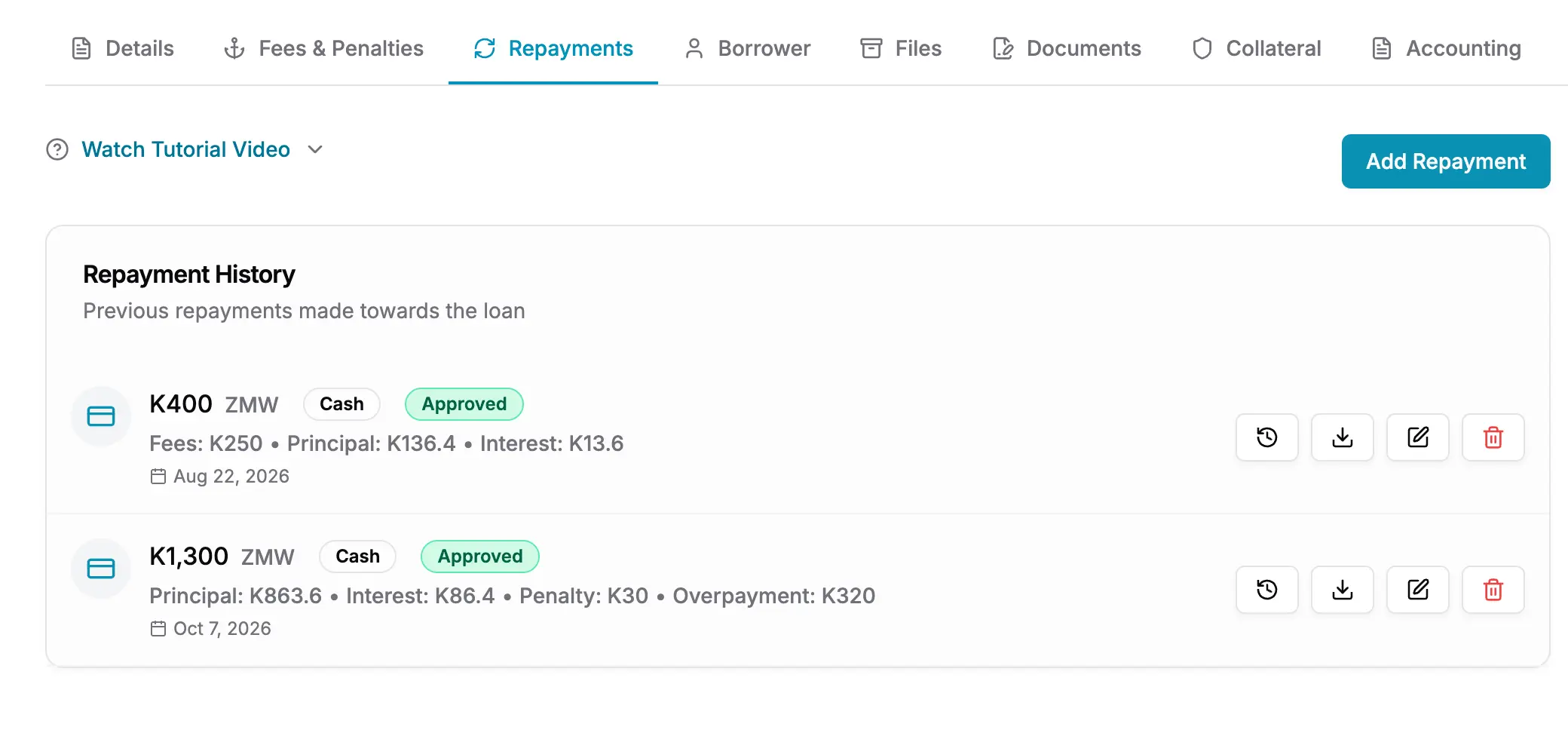
- 1The four-way split on a single payment
- 2The same four categories, in the same order, on every payment
Every repayment carries its own allocation, so the answer to “where did my money go” is on the payment itself.
Collateral register
Record the asset securing a loan: what it is, what it was valued at, when it was valued, and who holds the documents. The register is linked to the loan, so releasing security becomes a step in closing the loan rather than a note in somebody’s drawer.
Document e-signing
Sign loan agreements inside Lendbox. You sign the template once, as the lender. Each borrower then signs their own agreement, per loan. The signed document is stored on the loan, so the agreement and the balance it created are never in two different places.
Multi-branch
Loans belong to a branch. Staff hold a role per branch, so the same person can be a loan officer in one branch and a manager in another. What someone can see, raise or approve follows the branch they are working in, not one global role applied everywhere.
Recycle bin
A deletion is not the end of a record. Deleted items go to the recycle bin and can be restored. The bin knows what depends on what, so a client cannot be removed out from under an open loan, and an accidental delete does not become a gap in the audit trail.
What the auditor sees
Every action carries a name and a time
Lendbox writes the entry as the action happens, against the record it happened to. It is not a summary assembled at month end.
When an auditor points at a loan and asks how it came to be approved at that amount, the answer is on the loan. They can see the officer who raised it, the manager who approved it, the date each of them acted, and every edit since.
- The user who created, edited or deleted each record
- The timestamp on every action
- The approver at each stage of the workflow
- Restored records, and who restored them
Before you start
- We already have a book running. Can we bring it across?
- Yes. Import your existing clients and loans with their balances, and set each loan’s opening position so its schedule continues from where it is today. You do not have to close your current book to start.
- We run several different loan products. Is that a problem?
- No. Create a product for each. Different interest methods, fees, penalties and grace periods run side by side, and a loan follows the product it was written on, so the terms of one never leak into another.
- What happens to our data if we cancel?
- It stays yours. Export your clients, loans, transactions and ledger before you go. Your book is not held as leverage to keep you on a plan.
Questions people ask
- Loan management software is the system of record for a lender’s loan book. It holds the borrower, the loan terms, the approval decisions, the repayment schedule, the payments received and the documents signed — so the state of every loan can be established from one place rather than reconstructed from spreadsheets and messages. If you are still comparing options, our guide to the best loan management platforms sets out what to weigh before you commit.
- Yes. Both are set on the loan product, along with the day count convention — Actual/365 or 30/360. Products using different methods can run side by side on the same book.
- It is the rule that decides which part of a debt a payment settles first. The payment fills each category in turn and stops when the money runs out: penalties, then fees, then interest, then principal. In Lendbox that order is fixed rather than configured, so it is identical on every loan and every product, and the resulting split is recorded on each repayment.
- Yes. Approval workflows are drawn on a canvas, stage by stage, and applied per loan product. Maker-checker is enforced, so the user who raises a loan cannot approve it themselves.
- Loans and clients are scoped to a branch, and staff hold a role per branch rather than one role across the institution. The same person can be a loan officer in one branch and a manager in another.
- Yes. Deletions go to a recycle bin and can be restored. The bin is dependency-aware, so records that other records rely on cannot be removed silently.
- Yes. The same loan lifecycle, approval controls and audit trail serve both. SACCOs typically also use the member-facing side, and microfinance institutions typically lean on branch scoping and arrears reporting. If you are weighing micro loan management systems for either, our comparison of the leading platforms covers both.
What is loan management software?
Does Lendbox support flat rate and reducing balance interest?
What is waterfall allocation on a loan repayment?
Can we set our own approval process?
How does Lendbox handle multiple branches?
Can a deleted loan be recovered?
Is Lendbox suitable for a SACCO as well as a microfinance institution?
Whichever part brought you here, this comes with it
- Unlimited borrowers, loans and files
- No charge per record. Your bill does not grow because your book did.
- Your staff on web, Android and iOS
- The same data on a laptop at the branch and on a phone in the field.
- A complete audit trail
- Every action carries the name of the person who took it and the time they took it.
Put this on your own loan book
Create an account, set up one loan product, and run a real loan through it end to end. Nothing to install.
30-day free trial. No card required.