Integrated accounting
A general ledger that posts itself from your loan book
Disbursements, accruals, repayments, fees, penalties and write-offs become journal entries as they happen. Month-end starts from books that already agree.
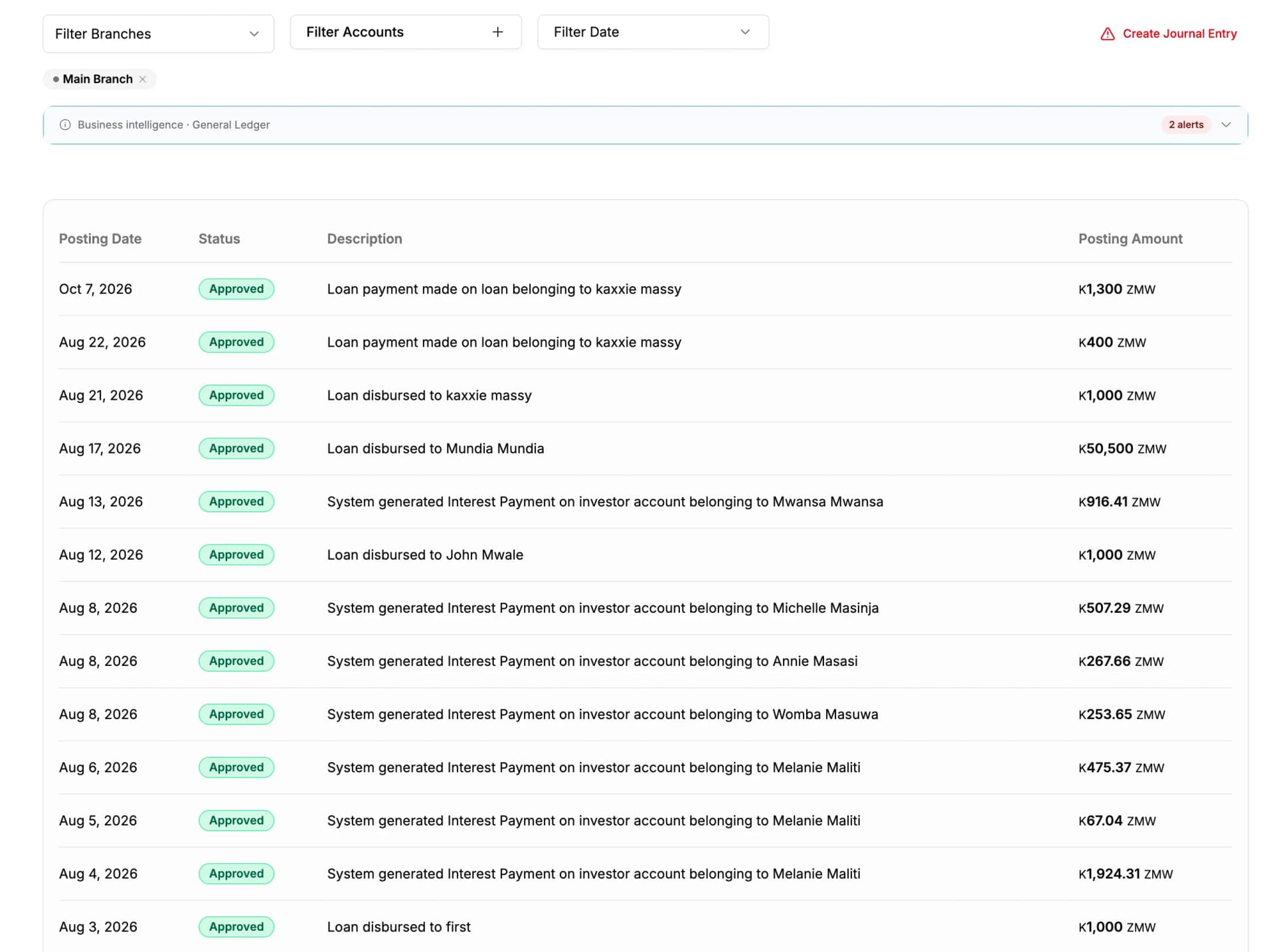
- 1Entries generated from loan activity, not re-keyed
- 2The period selector — the ledger is always current, not assembled at month end
Nobody typed these. Each entry was written by the loan event that caused it, and links back to the loan.
Month-end
The same close, on either side of the change
The difference is not that one is faster. It is that one of them contains a reconciliation step and the other does not.
Month-end today
- Export the loan book to a spreadsheet.
- Re-key disbursements, repayments, fees and penalties into your accounting package as journals.
- Rebuild the interest accrual for the period by formula.
- Reconcile the loan book against the accounts, and find a difference.
- Chase the difference through two systems until it closes — or write it off and move on.
- Explain the variance to the auditor from memory and a stack of printouts.
Three days, if nothing unusual happened during the month.
Month-end on Lendbox
- The journals are already posted. They were written as the loans disbursed and repaid.
- Interest has already accrued, on the schedule the product sets.
- Open the trial balance.
- Drill from any figure to the journal behind it, and from the journal to the loan.
There is nothing to reconcile, because there is only one set of books.
Event to journal entry
What posts, and exactly what it posts
Every loan event has a posting rule. Three of them are worked out in full below — an accountant should be able to check these line by line.
| Loan event | What posts to the ledger |
|---|---|
| Disbursement | Debits loans receivable, credits the account the money left, and holds any fee deducted at release. |
| Interest accrual | Debits interest receivable and credits interest income, on the schedule the loan product sets. |
| Repayment | Debits the account the money arrived in, then credits penalties, fees, interest and principal in that order, until the payment is used up. |
| Fees | Credits fee income when the fee is charged, or deferred fee income where it is recognised across the term. |
| Penalties | Debits penalties receivable and credits penalty income at the moment the penalty is charged. |
| Write-off | Debits the loan loss account and credits loans receivable, closing out the exposure. |
| Loan discounts | Debits discount allowed and credits loans receivable by the amount forgiven. |
| Deferred revenue | Releases deferred fee income to fee income over the life of the loan. |
Disbursement
BalancedLoan LN-4821 · 45,000 released · 2% arrangement fee deducted
Repayment
BalancedLoan LN-4821 · 3,200.00 received · 6 days late
Interest accrual
BalancedMonth end · LN-4821 · 3.5% on the outstanding balance
Illustrative entries against one loan, in your own reporting currency. Your accounts and posting rules come from your chart of accounts and your loan products.
What it does
The accounting side, in full
This is a general ledger, not a report that looks like one. The statements are produced from posted double entry, which is why they tie.
Your own chart of accounts
Accounts carry a code, a name and a type — asset, liability, equity, income or expense — and nest into sub-accounts. Set opening balances with the date they apply from. Institutions that already have a chart keep it; the loan postings map onto the accounts you already use.
Trial balance and financial statements
Trial balance, profit and loss, balance sheet and cashflow, produced from the posted ledger for any period. Interest income, fee income and penalty income are separate lines, because a board that cannot see where the income came from cannot tell a growing book from a punitive one.
Multi-branch accounting
Every entry carries the branch it belongs to. Run the ledger and the statements for one branch, or for the institution as a whole, from the same posted data. A branch manager sees their own performance; head office sees the consolidation without asking anyone to prepare it.
Manual journal entries, attributed
Some entries are always manual — a bank charge, a correction, an accrual outside the loan book. Post them here, and they carry the user who posted them, the date and the narration. Manual entries are marked as manual, so the automatic and the hand-made are never confused for one another.
Posted entries are not quietly editable
Every entry carries the date the transaction belongs to. Once an entry is posted, changing it is not a silent edit — the change is raised for approval, and a second user has to accept it. What the ledger said last month is still what it said, and the fact that someone wanted it changed is itself part of the record.
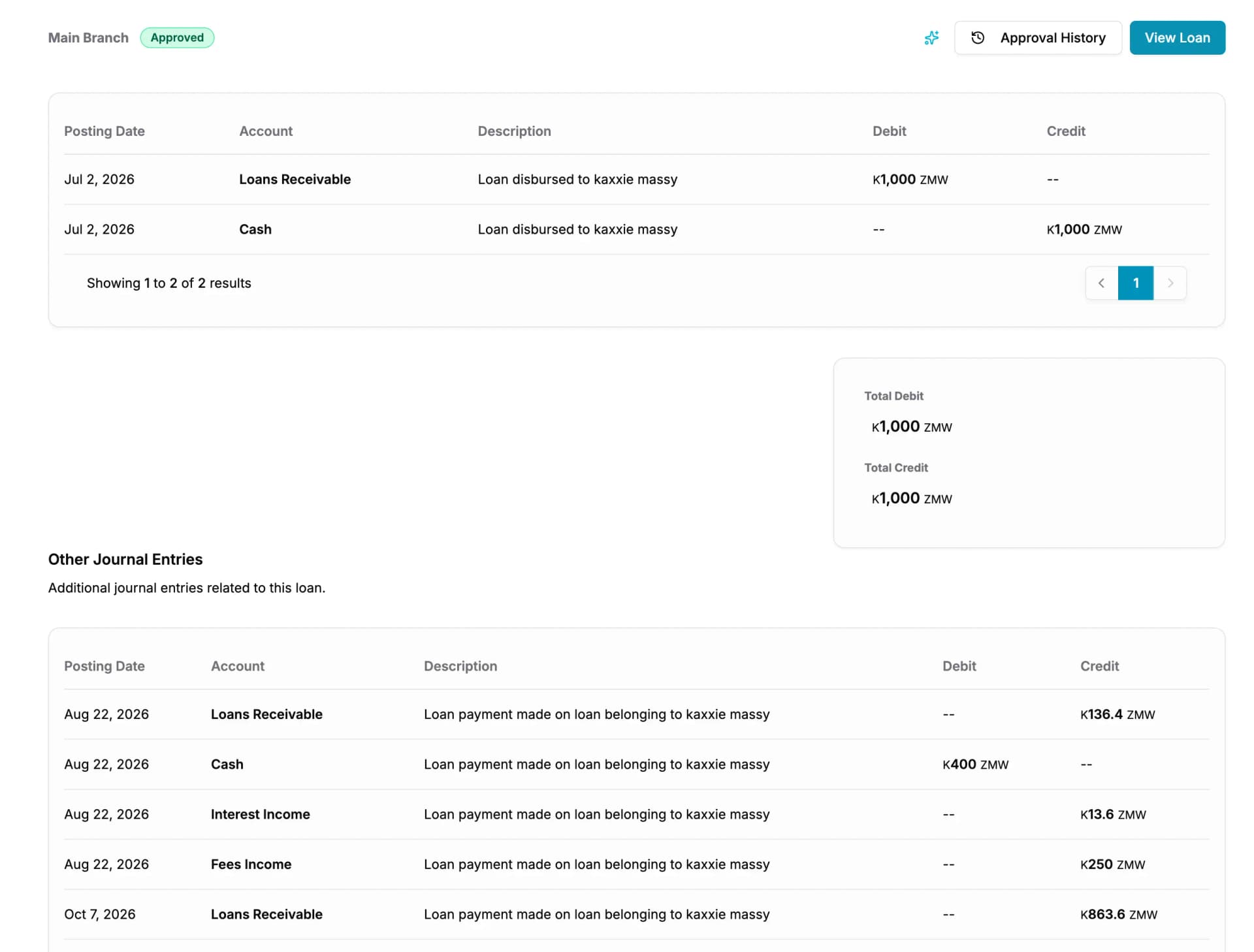
- 1The debit and credit lines
- 2The source loan behind the posting
Every automatic entry keeps a link to the loan that caused it.
For the auditor
Every figure traces back to a loan without anyone preparing it
The reason an audit is expensive is rarely the audit. It is the week your team spends assembling the evidence for it.
Here the evidence already exists. A figure on the statements is a total of journals; each journal has its lines, the user who posted it, and — where it was generated by loan activity — the loan that caused it. The auditor follows that chain themselves.
- The full general ledger for any period
- Entry-level attribution: who posted it, and when
- The source loan behind every automatic posting
- Manual entries, marked as manual, with their narration
Before you start
- Do we still need separate accounting software?
- For the loan book, no — the ledger, the trial balance and the financial statements are here. Institutions with activity well outside lending sometimes keep their existing package for that, and use Lendbox as the authoritative source for everything the loan book generates.
- Can we get the numbers out to our accountant?
- Yes. The ledger and the reports export, so your accountant can work from the same figures without a login. Since every posting carries its source loan, questions come back as “show me this entry”, not as “rebuild this month”.
- How do opening balances work when we migrate?
- Each account in your chart takes an opening balance and the date it applies from, so the ledger starts from your real position on the day you switch. Loans are imported with their outstanding balances, and postings run forward from there.
Questions people ask
- Yes. Loan events post as balanced journal entries against your own chart of accounts, and the trial balance, profit and loss, balance sheet and cashflow are produced from that posted ledger.
- Disbursements, interest accruals, repayments — allocated across penalties, fees, interest and principal — fees, penalties, write-offs, loan discounts and the release of deferred revenue.
- Yes. The chart is configurable per institution, with account codes, types and sub-accounts, and loan postings map onto the accounts you already use.
- Yes — trial balance, profit and loss, balance sheet and cashflow, for any period, from the posted ledger.
- Yes. Every entry carries its branch, so the ledger and the statements can be run for one branch or for the whole institution from the same data.
- Not silently. A change to a posted entry is raised for approval and has to be accepted by another user, and both the original and the change remain part of the record.
Does Lendbox do double-entry accounting?
Which loan events post automatically?
Can we use our existing chart of accounts?
Can we produce a trial balance and financial statements?
Does the accounting work across branches?
Can a posted journal entry be changed?
Whichever part brought you here, this comes with it
- Unlimited borrowers, loans and files
- No charge per record. Your bill does not grow because your book did.
- Your staff on web, Android and iOS
- The same data on a laptop at the branch and on a phone in the field.
- A complete audit trail
- Every action carries the name of the person who took it and the time they took it.
Put this on your own loan book
Create an account, set up one loan product, and run a real loan through it end to end. Nothing to install.
30-day free trial. No card required.