SMS
- Reaches any phone, smartphone or not
- Your own wording on every event
- Up to 160 characters a credit
- Offered country by country; the Credits Dashboard shows the cost where you lend
Messaging and notifications
Set the reminders once and Lendbox sends them for every loan: two days before an instalment, the day before, the morning it falls due, and after it is missed. Each event goes out on the channels you tick, in the words you write, at the hour you choose.
Start free trialHi Mutale, your next loan instalment is due this Friday. Thank you for paying on time. Chipata Credit
Your instalment was due yesterday and we have not received it yet. Please pay today to keep your loan in good standing.
Payment received. Thank you, your loan balance has been updated.
Illustrations; Chipata Credit is not a real lender.
When reminders go out
Each row is switched on or off per channel in Settings → Notifications, and saves the moment you click.
Reminders go out at the send time you set on each row, in the time zone from your General settings, so a 07:30 reminder leaves at 07:30 for your branches rather than at whatever hour the server keeps.
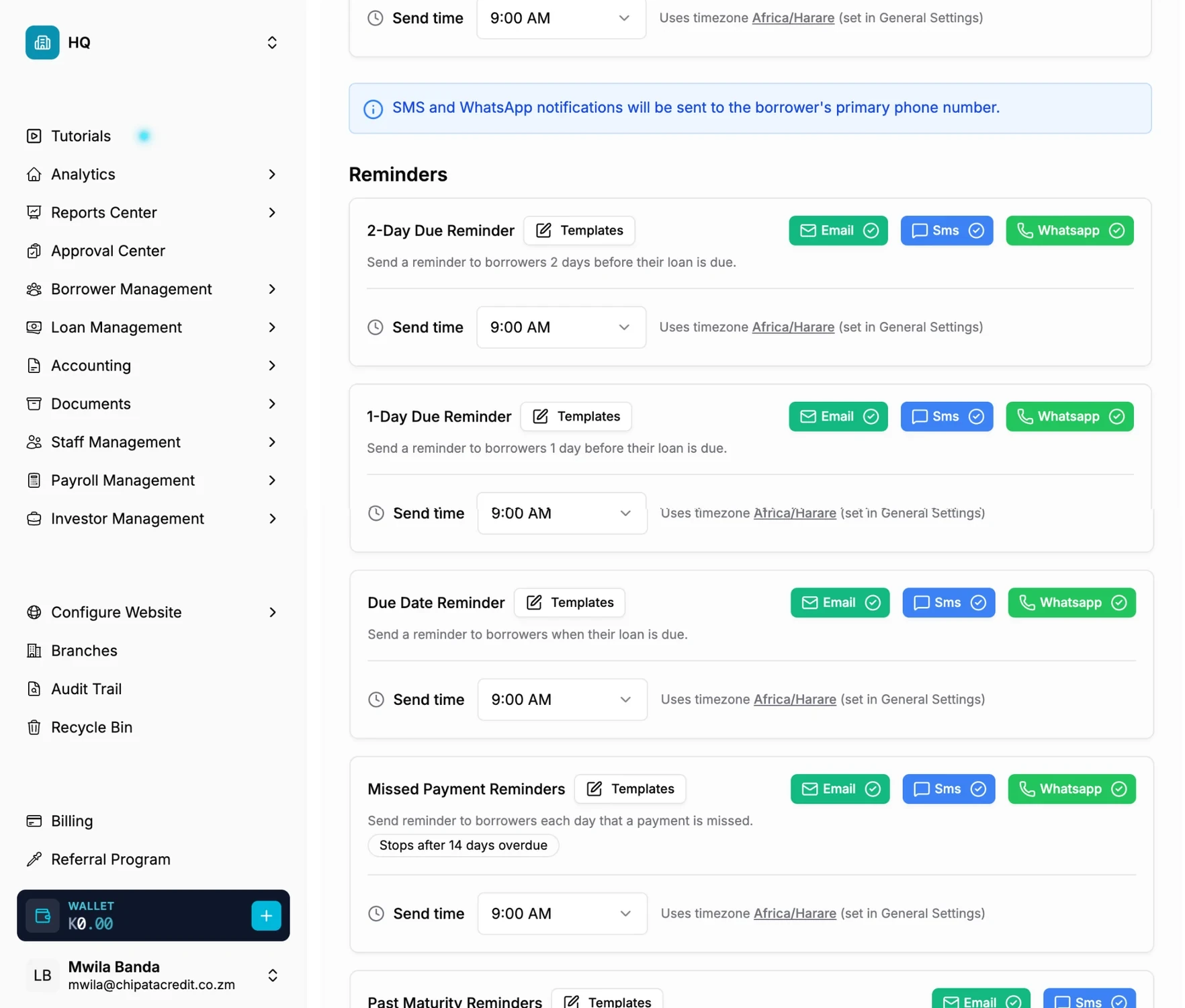
One row per event, one toggle per channel, and the hour each reminder leaves.
| Event | When it goes out | SMS | ||
|---|---|---|---|---|
| Reminders | ||||
| 2-day due reminder | Two days before each instalment, at your send time | Yes | Yes | Yes |
| 1-day due reminder | The day before each instalment | Yes | Yes | Yes |
| Due date reminder | On the due date, at your send time | Yes | Yes | Yes |
| Missed payment reminders | After an instalment is missed, stopping after 14 days | Yes | Yes | Yes |
| Past maturity reminders | After the loan’s final due date passes, stopping after 14 days | Yes | Yes | Yes |
| Loan status | ||||
| Loan status updates | When a loan’s status changes | Yes | Yes | Yes |
| Loan active | When the loan is disbursed and becomes active | Yes | Yes | Yes |
| Loan completion | When the loan is repaid in full | Yes | Yes | Yes |
| Loan default | When the loan is marked as defaulted | Yes | Yes | Yes |
| Payments | ||||
| Payment received | When a repayment is posted to the loan | Yes | Yes | Yes |
| Investors (sent to the investor) | ||||
| Deposit, withdrawal and bank fee | When money moves on an investor account | Yes | Yes | Yes |
There is also a Daily Account Summary for your own team: email only, and it uses no credits.
Everything happens in the dashboard, and the whole setup takes about as long as writing the messages.
Every event has a Templates button. For email and SMS you either keep the predefined message or write your own, and insert placeholders for whatever changes from loan to loan: details of the borrower and the loan, the next instalment from the repayment schedule, past repayments, penalties and collateral. Lendbox fills them in for each borrower when the message goes out.
An SMS longer than 160 characters may be split in two and use two credits, and the template editor reminds you of that limit while you write.
Dear [borrower first name], your instalment of [amount due] is due on [due date]. Pay by then to avoid a late fee. [your institution]
Illustration. In the editor, placeholders are picked from a list rather than typed.
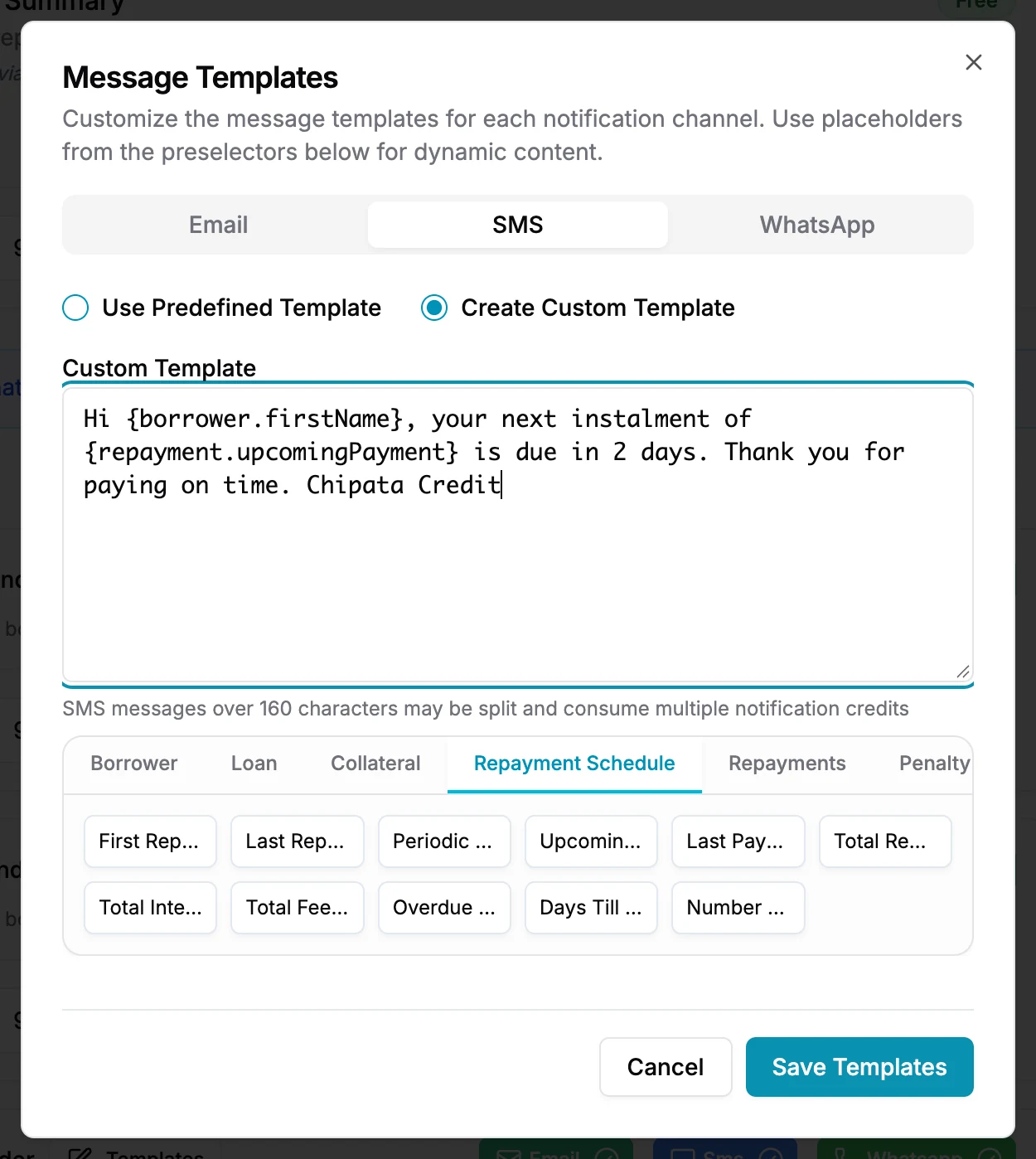
A custom SMS template, with placeholders picked from the list underneath.
Notifications draw on one prepaid balance. Each SMS segment, WhatsApp message and email uses credits at the rate for that channel and country, and the Credits Dashboard under Billing shows how many of each you can still send.
You buy credits on the same screen: by card everywhere, and in Zambia by mobile money or straight from your Lendbox wallet too. A banner appears on your dashboard when credits run low. Before you switch an event on, send a test SMS, WhatsApp message or email to yourself to see exactly what borrowers will get.
Need to nudge one borrower right now? Every loan has Send SMS Reminder, Send WhatsApp Reminder and Send Email Reminder buttons, which send immediately and draw on the same credits.
Turn on the 1-day reminder, write it in your own words and send yourself a test.
No card required