Payment rails · Zambia
MTN, Airtel and Zamtel mobile money, wired into your loan book
Borrowers in Zambia repay from their phones, and you pay loans out to them the same way. When the network confirms a payment, Lendbox records the repayment on the loan, recalculates the balance and the schedule, and moves the money into your Lendbox wallet. Nobody copies a transaction ID out of an SMS.
- Borrower’s phoneMTN · Airtel · Zamtel
- Your Lendbox walletZMW, held with a licensed commercial bank
- The loanRepayment posted, schedule updated
- Status
- Built in
- Available in
- Zambia, in workspaces that run in ZMW
- Networks
- MTN, Airtel and Zamtel
- Set up by
- Nothing to connect: the wallet comes with the workspace
How mobile money works inside Lendbox
You do not open a merchant account with MTN, Airtel or Zamtel, and there are no API credentials to paste into Lendbox. Every Zambian workspace has a Lendbox wallet in kwacha. Repayments arrive in it, payouts leave from it, and every movement sits in its transaction history next to the loan it belongs to.
Lendbox works out the network from the phone number itself, so a borrower never picks from a list and an officer cannot send a prompt to the wrong network by mistake.
The wallet, payment prompts and payment links appear only in workspaces that run in Zambian kwacha (ZMW). Lenders in other countries record repayments taken through their own channels, either on the loan or in a bulk upload.
Which numbers go to which network
| Network | Numbers starting | Collect repayments | Pay out loans |
|---|---|---|---|
| MTN Mobile Money | 096, 076 | Yes | Yes |
| Airtel Money | 097, 077 | Yes | Yes |
| Zamtel Money | 095, 075 | Yes | Yes |
If one network has an outage, Lendbox can pause that network alone. The dashboard says the pause is temporary, and the other two keep working.
Collect
Three ways a borrower repays by mobile money
All three end in the same place: a prompt on the borrower’s phone, their PIN, and a repayment on the loan.
- 1
A payment link
Every loan has one permanent payment link. Copy it into a chat, or send it from the loan by email or SMS; sending the link uses none of your notification credits. The borrower opens a page under your name, sees the loan and its schedule, enters an amount or taps Pay off, types a nine-digit number and approves the prompt. No account is needed.
- 2
A Request Payment prompt
From the loan, an officer picks the borrower’s primary or secondary number, or types another one, chooses an amount and sends the prompt. The borrower approves it on their phone while you are still talking. It is the tool for the moment a borrower says they can pay right now.
- 3
Make payment, in the portal
Borrowers who sign in to your borrower portal see a Make payment button on each loan. It runs the same mobile money flow without asking them for a loan number.
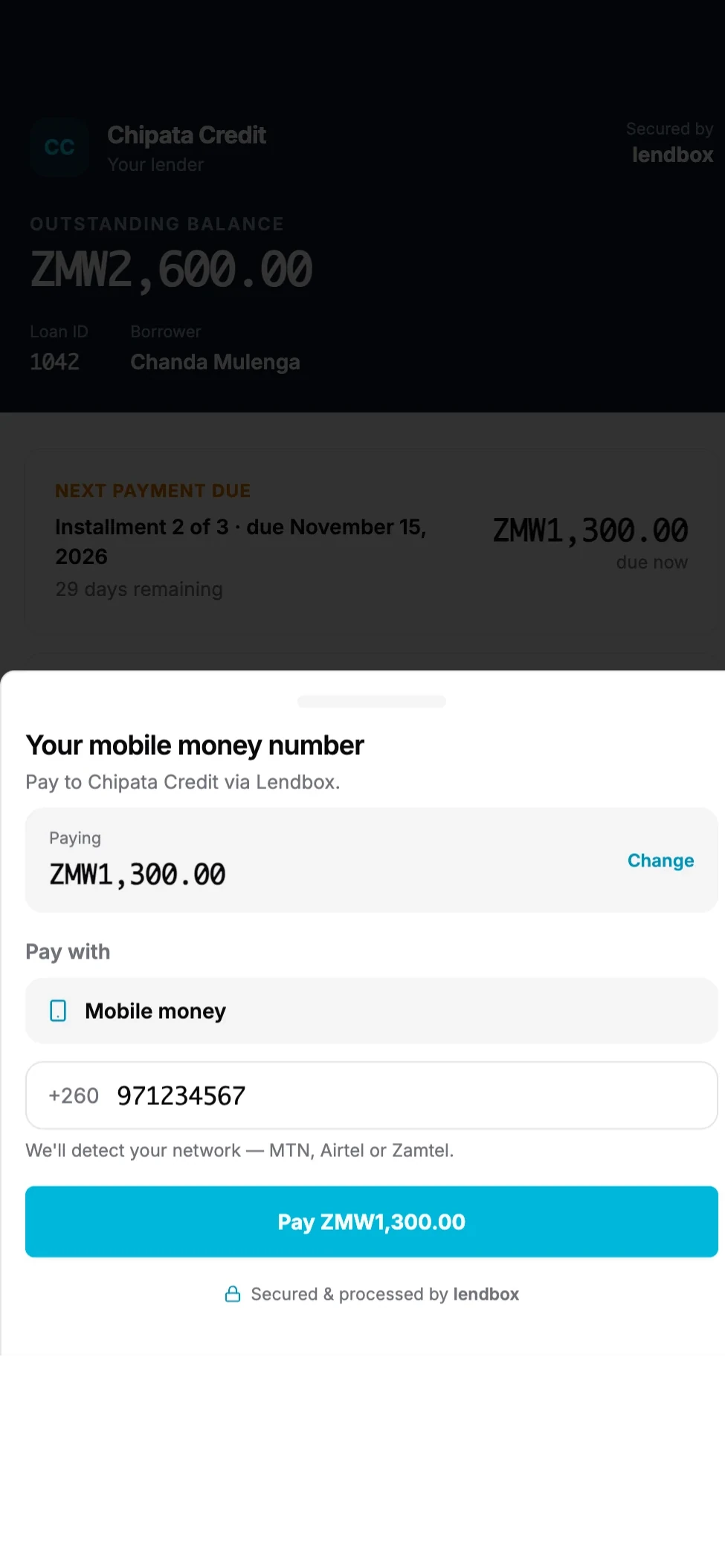
The page behind a payment link: the loan, its schedule and one field for the number.
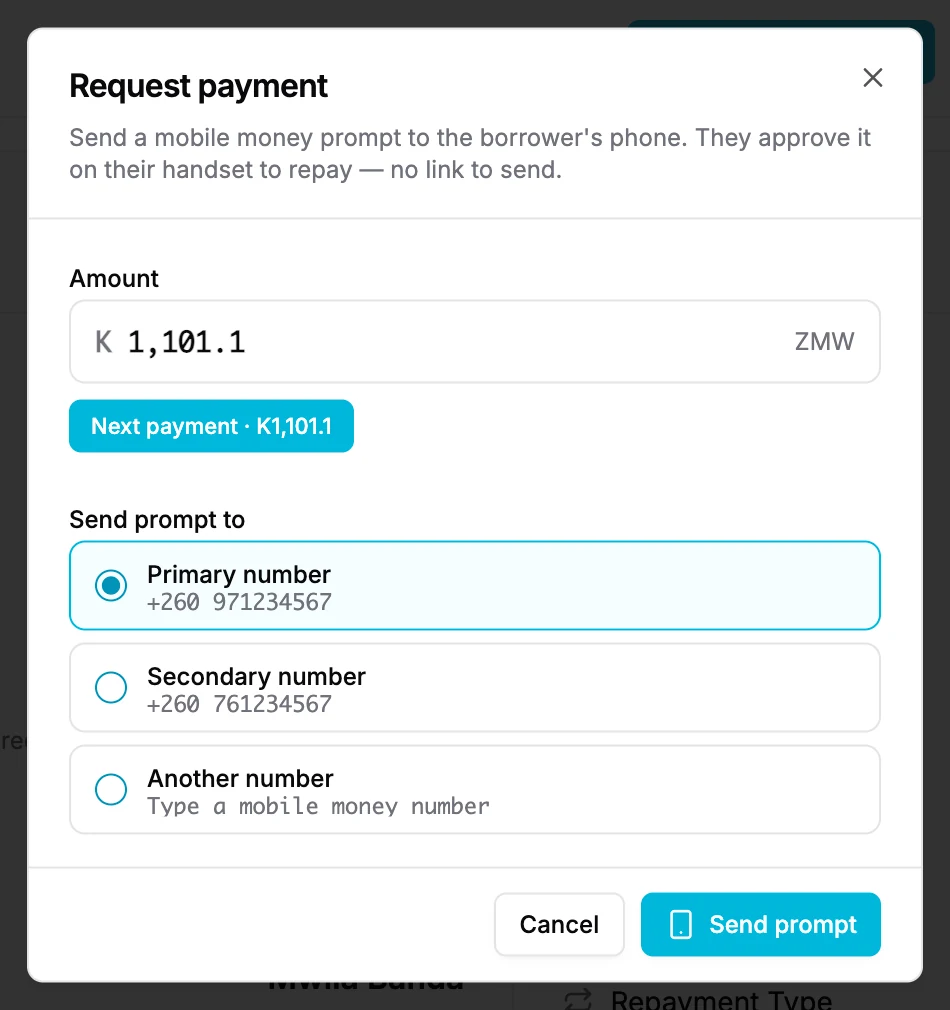
Request Payment sends a prompt to the number you pick while the borrower is on the line.
Whichever route a payment takes, it is tied to its loan before the prompt is sent, so there is never an unidentified deposit to trace at month-end. A repayment that arrived by mobile money cannot be deleted from the loan afterwards, which keeps the loan and the wallet in agreement.
Disburse
Pay loans out to a phone or a bank account
When a loan becomes active, the Disburse to borrower step opens. First you choose where the money comes from: your wallet balance, or a payment you make from your own phone that Lendbox passes on to the borrower once it clears. Then you choose where it goes: the borrower’s mobile money number or their bank account.
Lendbox looks up the name registered to the receiving number or account and shows it to you before you confirm, so a mistyped digit is caught before money moves. Every payout is then approved with a six-digit code sent to your email, which means a signed-in session on its own cannot move money.
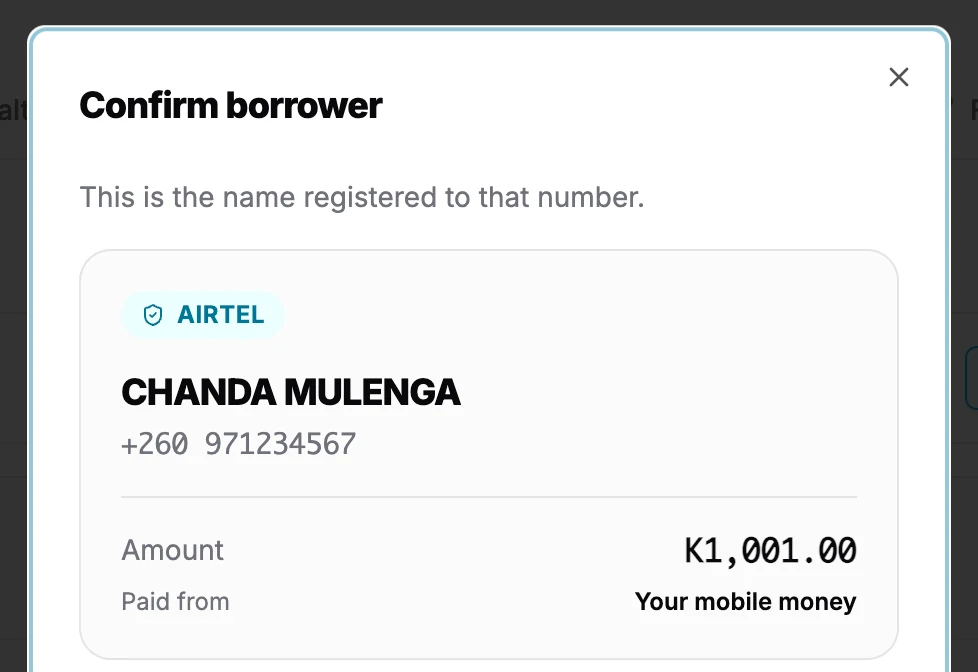
The name on the receiving number is shown before the payout is approved.
Four ways to handle the payout fee
Spread across repayments
The fee is recovered in parts through the borrower’s instalments.
Deduct from the disbursement
The borrower receives the principal less the fee.
You absorb it
You pay the fee and the borrower receives the full principal.
Add it to the principal
The fee becomes part of the amount the borrower repays.
Payout fees depend on the amount sent, and the exact fee is on the confirm step before you approve, so nothing is deducted that you have not seen.
The wallet: where the money sits between the borrower and your bank
Load up
Top the wallet up from mobile money ahead of a run of disbursements.
Withdraw
Move money out to a mobile money number or to a bank account. The name on the receiving account is shown first, and the withdrawal is confirmed with a code sent to your email.
Transaction history
Every repayment, payout, top-up and withdrawal, with its status and the loan it belongs to.
Who can do what
Seeing the wallet, withdrawing and disbursing are separate staff permissions, so an officer can collect repayments without being able to move money out.
Bank transfers in Zambia
What works with bank transfers, and what you record yourself
Built in
- Disbursing a loan straight to a borrower’s bank account, with the account holder’s name checked before you approve
- Withdrawing your wallet balance to your institution’s bank account
- Printing your banking details on every loan statement, set once under Settings → Statements
Recorded by your team
- A repayment a borrower makes by bank transfer or branch deposit: record it on the loan, or post a day’s or a month’s transfers together in one batch
- Lendbox does not read your bank statement or connect to a bank feed, so a transfer is matched to its loan when you record it, not before
The batch upload takes a spreadsheet with a loan number, an amount and a collection date on each row, and ignores any other columns, so a bank export often needs little more than a new heading. How it checks each row before posting is covered on the data migration page.
Limits to know before you rely on it
- Zambia only. The wallet and every mobile money action appear only in workspaces that run in Zambian kwacha (ZMW).
- One wallet per workspace. You do not bring your own MTN, Airtel or Zamtel merchant account; money moves through Lendbox’s payment partner.
- Request Payment is for individual loans. Group loans take their repayments in the dashboard.
- Payment links and prompts work on active, due, overdue and past-maturity loans, not on loans still waiting for approval.
- The borrower’s network may charge them for sending money. Lendbox’s own transaction fees are shown in the dashboard.
Frequently asked questions
- No. Mobile money runs through the Lendbox wallet that comes with every Zambian workspace, so there is no merchant account to open and no API credentials to set up. Repayments land in the wallet and payouts leave from it.
- On its own. The payment is tied to its loan before the prompt is sent, and when the network confirms it, Lendbox creates the repayment on that loan, updates the balance and the schedule, and records the money in your wallet. Nobody types it in afterwards.
- Yes. A payment link opens a page that needs no account: the borrower sees the loan, enters an amount and a phone number, and approves the prompt on their phone. Borrowers who do sign in to your portal can pay from there as well.
- Not yet. The wallet, payment links and payment prompts are available to workspaces that run in Zambian kwacha. Lenders in other countries record repayments taken through their own channels, either on the loan or in a bulk repayment upload.
- There is no setup fee and no charge per borrower. Collections, payouts and withdrawals carry standard transaction fees, and a payout or withdrawal shows its fee before you confirm it. The borrower’s network may also charge them for sending money. Your Lendbox plan is billed separately, in ZMW, and is listed on the Zambia pricing page.
- Yes. At disbursement you choose mobile money or bank. For a bank payout, Lendbox checks the account holder’s name and shows it to you before you approve with the code sent to your email.
Do I need my own MTN, Airtel or Zamtel merchant account?
How does a mobile money repayment get onto the loan?
Can borrowers pay without signing in?
Does this work outside Zambia?
What does mobile money cost to run?
Can I pay a loan out to a bank account instead of a phone?
Keep reading
- All integrationsLendbox integrationsMobile money in Zambia, SMS and WhatsApp reminders, Excel import, the REST API and webhooks, each marked with how it connects.
- CountryLendbox in ZambiaRegulator, licence types and the way Zambian lenders run their books on Lendbox.
- CountryPricing in ZambiaPlans billed in ZMW, paid by mobile money or card.
- RelatedBorrower repayment channelsThe portal, payment links, statements and signing links, side by side.
- RelatedLoan collections softwareArrears, reminders and the follow-up trail that sit behind every repayment.
- RelatedMicrofinance loan softwareHow microfinance institutions run high-volume books on Lendbox.
Take your next repayment by mobile money
Open a Zambian workspace, add a loan and send yourself its payment link.
No card required