Data migration

Moving your loan book to Lendbox, from Excel or another loan system

Lendbox has no live connector to another loan system. What it has is an importer for borrowers, an importer for loans and a bulk upload for repayments, all driven by Excel. Almost every loan system can export to a spreadsheet, so the same five stages move a book across from Excel, Loandisk, Musoni, Mambu, Mifos X or Loan Performer.

Status
Works with, via Excel import
File format
.xlsx; the borrower importer also reads .xls
Set up by
You, from the dashboard
Coming from
Excel, Loandisk, Musoni, Mambu, Mifos X, Loan Performer
On this page

The five stages of a migration

Work through them in this order. Each stage relies on the one before it, and nothing posts to your books until you confirm it.

  1. 1

    Import borrowers

    Open Borrower Management → Borrowers → Bulk Import Borrowers and download the Excel template. Fill in one row per borrower. Only First Name and Identification Number are required, and every identification number must be unique, because the loan import finds each borrower by it. Upload the file, fix any row the preview flags, and import. Borrowers go into the branch you have selected, so import one branch at a time.

  2. 2

    Import loans at their original terms

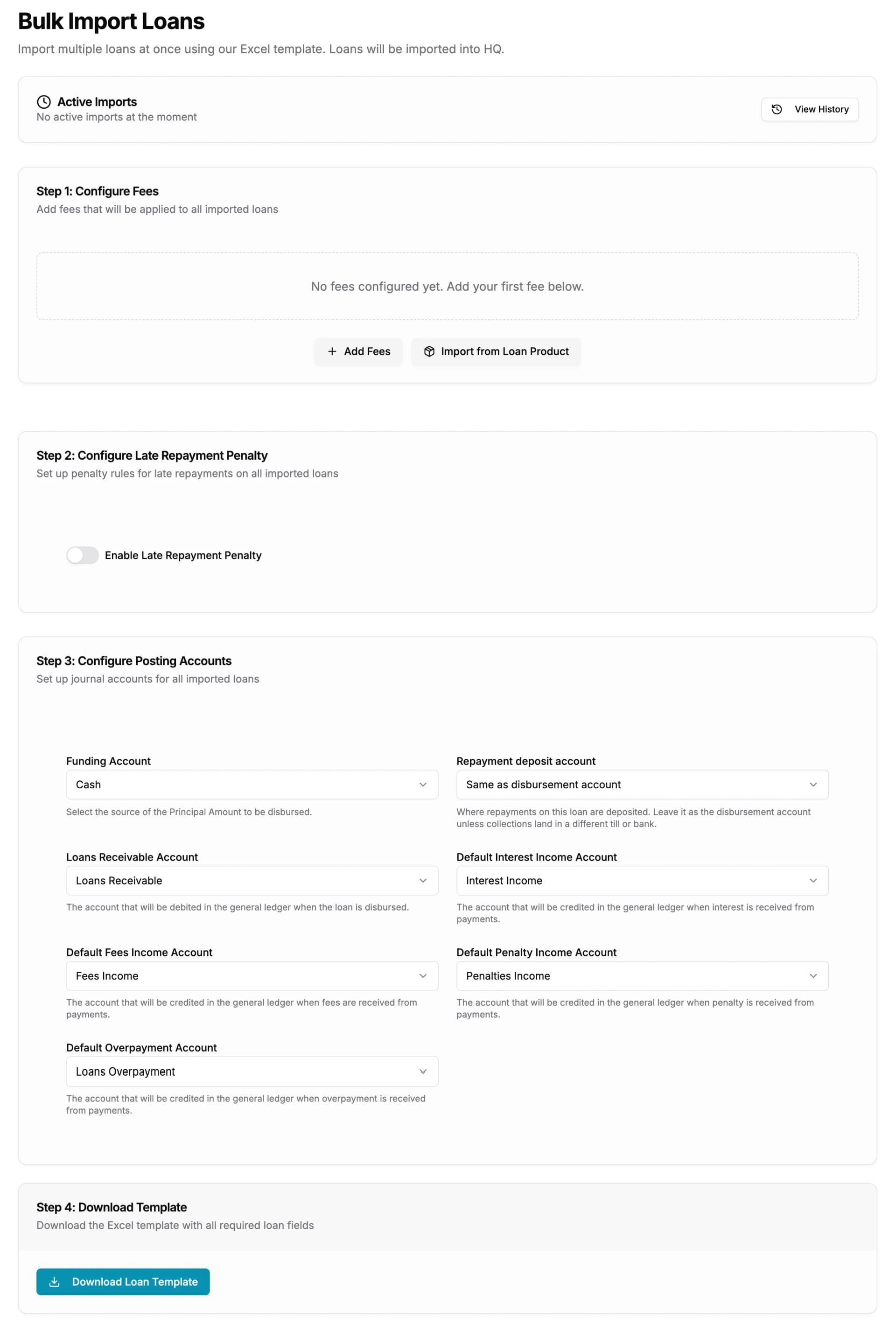
    Open Loan Management → Loans → Bulk Import Loans. The page takes you through six steps: the fees to apply, the late-repayment penalty, the posting accounts, the template, the data and the upload. Give each loan its real release date, principal, duration, interest method and rate, and its current status. The preview calculates each loan’s repayment schedule, so you can open one and compare it with the old system before you import.

    The Bulk Import Loans page with steps for fees, penalty, posting accounts and the template

    The loan import asks for fees, penalty and posting accounts before it hands you the template.

  3. 3

    Post the repayment history

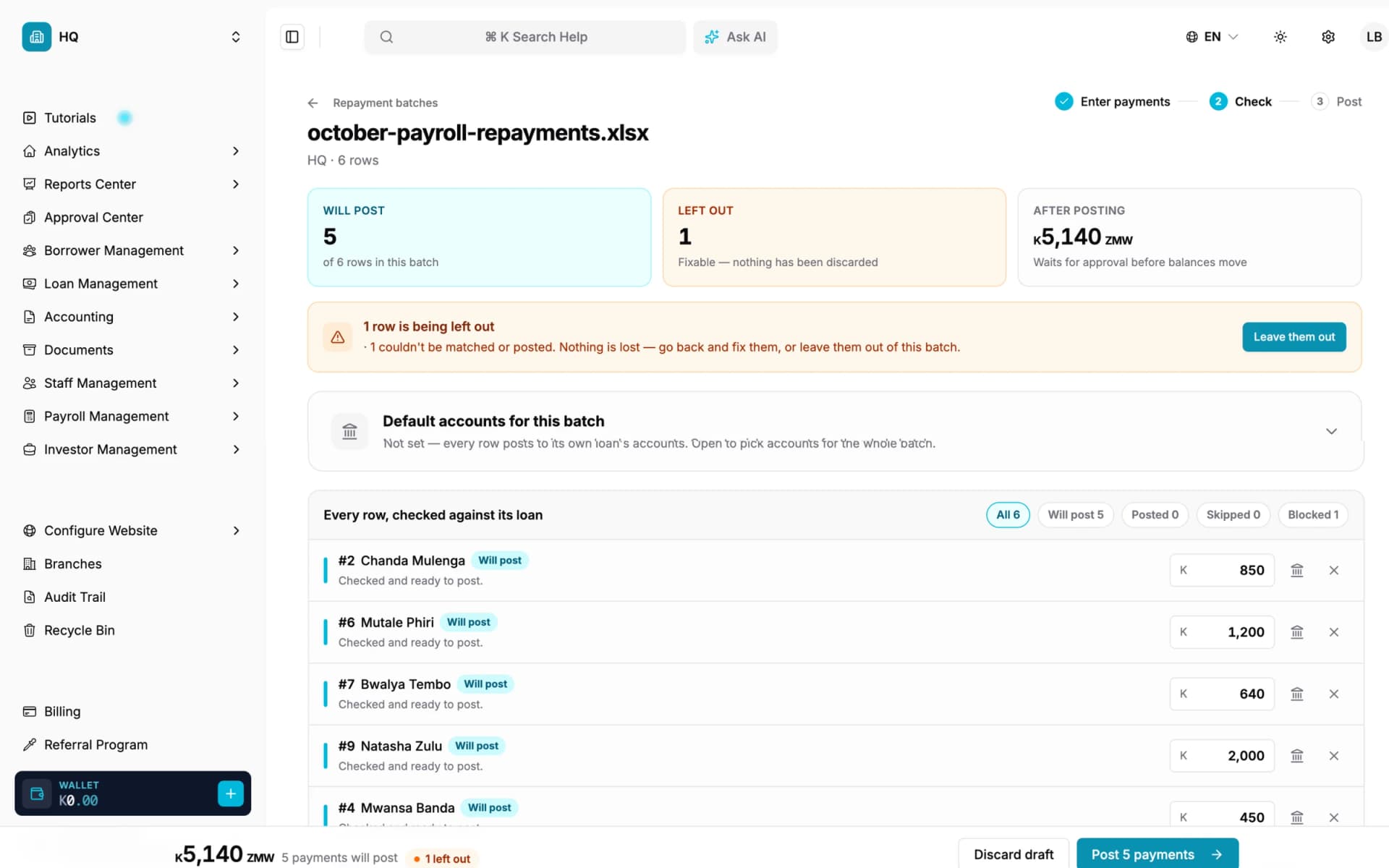
    A loan imports as if nothing has been paid on it. Bring its past repayments in through Loan Management → Bulk Repayments → Import a spreadsheet, one row per repayment with the loan number, the amount and the date it was actually collected. Lendbox checks every row, skips likely duplicates unless you choose to keep them, and posts the batch once it is approved in the Approval Center. Balances, arrears and the schedule then follow from the real payment history.

    The bulk repayment check screen showing rows that will post and a skipped duplicate

    The repayment sheet is checked row by row; likely duplicates are skipped unless you keep them.

  4. 4

    Set the ledger’s opening balances

    In Accounting → Chart of Accounts, give each ledger account its opening balance and the date it applies from, taken from your last trial balance. From then on the ledger posts itself from loan activity.

  5. 5

    Reconcile, then switch

    Before you retire the old system, compare totals branch by branch: borrowers, loans by status, principal released, outstanding balance and arrears. Run one repayment cycle in both systems, and switch once they agree.

Between stages 2 and 3, use Export Loans on the Loans list. An Excel sheet of the branch’s loans arrives by email, and you match each old loan to its new Lendbox loan number before you build the repayment sheet.

Borrower template columns

Headings must match the template exactly, and the importer reads the first sheet. Dates are written DD-MM-YYYY and phone numbers carry the country code.

Columns in the Lendbox borrower import template
ColumnRequiredWhat it takes
First NameYesFree text
Last NameNoFree text
Identification TypeNoNational ID, Passport or Driver License
Identification NumberYesUnique per borrower; the loan import matches on it
GenderNoMale, Female, M or F
Date of BirthNoDD-MM-YYYY
Marital StatusNoSingle, Married, Divorced, Widowed or Separated
OccupationNoEmployed, Self Employed, Student or Unemployed
Employer, Employee Number, Tax Identification NumberNoFree text
Primary Phone Number, Secondary Phone NumberNoWith the country code, such as +260
Email, Address, City, State, ZipcodeNoFree text
Next of Kin columnsNoFirst and last name, relationship, email, two phone numbers, address, city, state, zipcode, occupation and employer for one next of kin

Loan template columns

The borrower must exist before their loan does: each loan is matched to its borrower by identification number.

Columns in the Lendbox loan import template
ColumnRequiredWhat it takes
Borrower Identification NumberYesMust match a borrower already imported
StatusYesRequested, Processing, Active, Defaulted or Denied
PrincipalYesThe amount released
Release DateYesDD-MM-YYYY, the day the loan was actually disbursed
DurationYesA number and a unit, such as 12 Months
Interest MethodYesFlat, or the amortised (reducing-balance) option, spelled as in the template
Interest RateYesThe rate per interest cycle
Interest CycleYesOnce, Per Day, Per Week, Per Month or Per Year
Repayment TypeYesStandard or Interest Only Balloon
Repayment CycleYesOnce, Daily, Weekly, Biweekly, Monthly, Quarterly, Semi-annual or Yearly
Staff Member EmailNoThe officer the loan belongs to
Product NameNoLinks the loan to one of your Lendbox loan products
Collateral Name, Description, Defects, ValuationNoOne item of collateral per loan

There is no column for an amount already paid or for an outstanding balance. The balance comes from the repayments you post at stage 3, so it is the result of real payments rather than a typed figure.

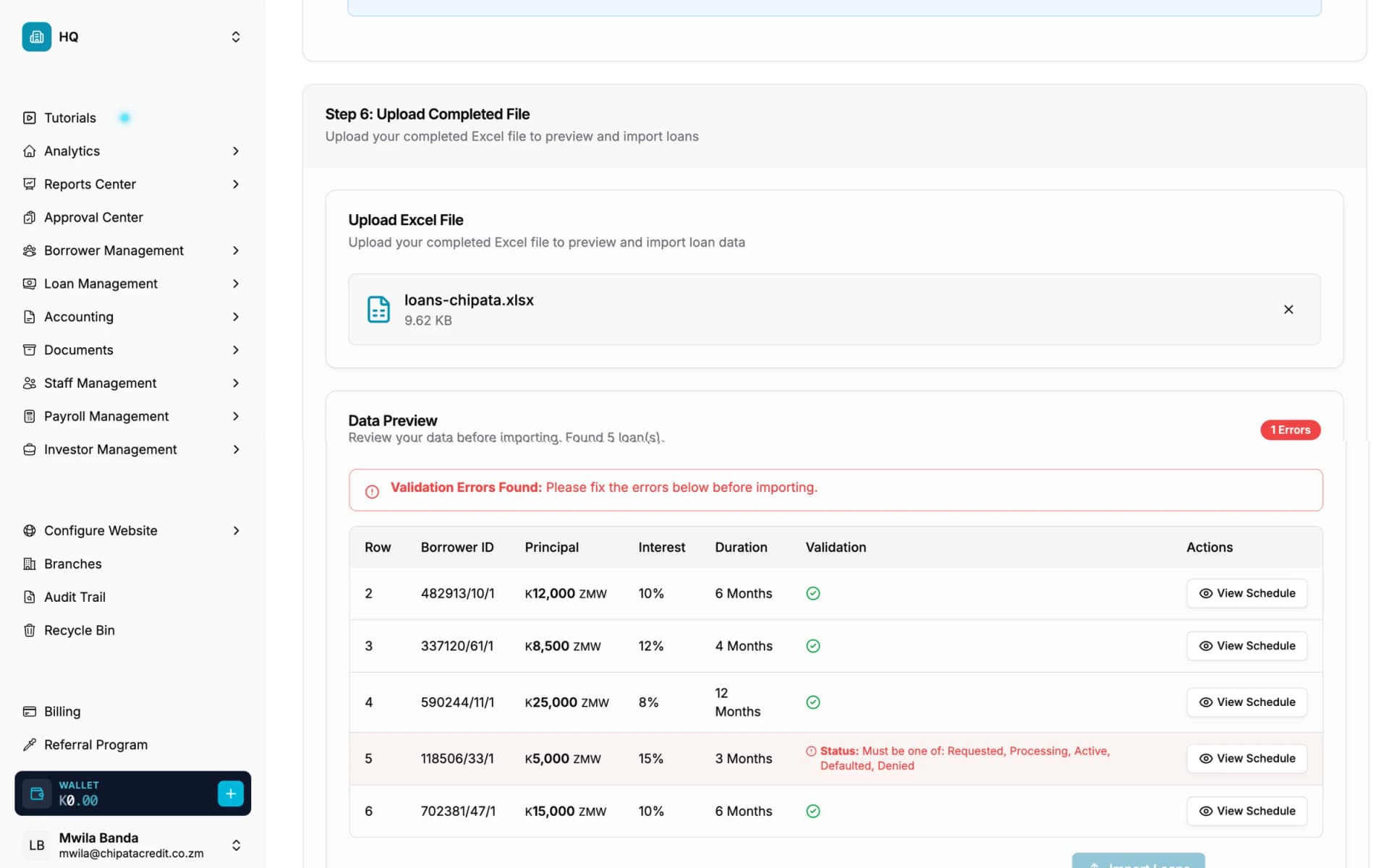
The loan import data preview with one row flagged and a View Schedule button on every row

Every row is checked before import, and each loan’s schedule can be opened from the preview.

Repayment upload columns

One .xlsx file of up to 1,000 rows, with the headings in row 1. Extra columns are ignored and column order does not matter, so a payroll or bank export can often go in as it is.

Columns in the Lendbox bulk repayment upload
ColumnRequiredWhat it takes
Loan NumberYesThe Lendbox loan number, from the Loans list after import
AmountYesThe amount collected; currency symbols are allowed
Collection DateNoThe day the money was received; left blank, it means today
DescriptionNoShown on the repayment

Group loans cannot be posted through the bulk upload yet, so record a group loan’s history on the loan itself.

Moving from your current system

The five stages are the same wherever you are coming from. What changes is where the data comes out and how its columns map onto the Lendbox templates.

Excel and Google Sheets

A spreadsheet book is usually the quickest move, because the data is already in the shape the importers read.

  • Split a single sheet into three: one for borrowers, one for loans and one for repayments
  • Give every borrower a unique identification number before you start; duplicates in a hand-kept book are the most common import error
  • Turn running-balance columns back into dated repayment rows for the bulk upload
Read the step-by-step guide to leaving Excel

Loandisk

Most lenders on Loandisk start from its borrower and loan lists exported to spreadsheets. Save any CSV export as .xlsx before you copy columns across.

  • Map Loandisk’s borrower fields onto the Lendbox borrower template, keeping one identification number per borrower
  • Translate each loan’s interest method and repayment cycle into the values the loan template lists
  • Bring past repayments in as dated rows through the bulk upload
How Lendbox compares with Loandisk

Musoni

Start from Musoni’s client and loan reports exported to Excel, and work branch by branch.

  • Import group members as individual borrowers, then set the groups up in Lendbox
  • Carry savings balances across separately: the importers bring in borrowers and loans only
  • Post each loan’s repayment transactions with their original dates
How Lendbox compares with Musoni

Mambu

Mambu keeps clients, loan accounts and transactions apart, which lines up with the three Lendbox files.

  • Export clients for the borrower template and loan accounts for the loan template
  • Recreate your Mambu products as Lendbox loan products first, so the Product Name column links each loan
  • Export repayment transactions with their value dates for the bulk upload

Mifos X and Apache Fineract

Mifos X books come across from its client, loan and transaction listings, exported from its reports or run against its database by whoever hosts it.

  • Use the client listing for borrowers and the loan listing for loans
  • Translate Fineract’s interest calculation settings into the Lendbox interest method and repayment cycle
  • Post repayment transactions with their transaction dates through the bulk upload

Loan Performer

Loan Performer usually runs on a local database, so the data comes out through its reports exported to Excel, or through an export your IT support runs.

  • Run the client list and loan portfolio reports per branch, and export each
  • Check dates come out as DD-MM-YYYY, the format the importers read
  • Leave savings and share balances for a separate plan: the importers cover the lending side

Loandisk, Musoni, Mambu, Mifos X and Loan Performer are trademarks of their owners. Lendbox is not affiliated with any of them and has no direct connection to their systems.

What doesn’t move across

Plan for these before the cut-over date, because the importers will not bring them.

Savings and share balances
The importers bring in borrowers, loans and repayments. Deposit and share balances need a separate plan.
Documents and scans
Files attached to borrowers in the old system have to be uploaded again to the borrower record.
Old approval history
Who approved what in the old system stays in its own records. The Lendbox audit trail starts on the day you import.
Group structure
Borrowers import as individuals. Set up groups in Lendbox once the members are in.
Custom fields
The templates have fixed columns. Create your custom borrower fields in Settings → Borrowers, then fill them in after the import.

Planning the cut-over

Pick a cut-over date at the end of a repayment cycle, when the fewest instalments are in flight. Import borrowers and loans a few days before it, check them, and post the repayment history up to that date. From the cut-over date on, record new repayments only in Lendbox.

Keep the old system read-only for at least one full cycle. If a borrower disputes a balance, you have both records to compare, and your auditors can follow the totals from one system to the other.

Totals to agree before you switch

  • Number of borrowers in each branch
  • Number of loans in each status
  • Total principal released
  • Total outstanding balance
  • Loans in arrears, and the amount overdue
  • The trial balance on the cut-over date

Frequently asked questions

Can Lendbox import loans with their outstanding balances?
Not as a typed figure. A loan imports at its original terms and release date, and you post its past repayments through the bulk upload with their real collection dates. The outstanding balance, the arrears and the remaining schedule then come from those repayments, the same way they would have if the loan had started in Lendbox.
Is there a direct connector for Loandisk, Musoni, Mambu or Mifos?
No. Lendbox reads Excel files. Each of those systems can get its data into a spreadsheet, and from there the Lendbox importers take over.
Can I import CSV files?
Save them as Excel first. The loan importer and the repayment upload read .xlsx files, and the borrower importer reads .xlsx and the older .xls.
What happens to a row with a mistake in it?
The importer checks every row in your browser before anything is saved and lists the problems against the row, and the import button stays disabled until they are fixed. After an import, its history page lists any row that failed or was skipped, with the reason.
How many rows can I import at once?
A repayment upload takes up to 1,000 rows per file, so split a longer history into several files. Borrower and loan files can be up to 25 MB each.
Do I need Lendbox’s help to migrate?
No. The importers are self-service and included on every plan. If you would rather talk the plan through first, the team is a message away on the contact page.

Run a test import this afternoon

Start a trial, download the templates and import one branch’s borrowers before you commit the whole book.

No card required